When a Common Data Environment (CDE) implementation fails in the company, we often blame the software or point fingers at “resistant” teams.
But here is an uncomfortable truth: people don’t bypass your CDE because they are lazy or incompetent. Under intense project pressure (which happens quite often), human behavior dictates that we will always choose the fastest path of least resistance.
Today I would like to talk a bit about the mistakes that happen when we roll out CDE solution in the company.
I want to present a psychology of why we accidentally make our CDEs optional.
To make the post more concrete I will use Autodesk Forma (formerly ACC) as a CDE example.
The Subtle Death of a Thousand Exceptions
In many AEC companies, a typical rollout goes like this.
1. Leadership invests in Autodesk Forma licenses.
Let’s say you are BIM Manager there, who organizes all of this for your comepnay.
You sets up a clean folder structure, grants permissions, and organizes a week of training. Everyone involved in trainings nods and agrees to use it.
You think – Big Win!!!
When the Pressure Hits, Habits Win
Then, reality hits.
People start working in the projects with a new CDE setup.
But… times goes by
…..and major project deadline approaches, a design change needs an immediate answer, and stress levels spike. To move faster, designers start to share models and PDF via emails.
Documents are send via Teams chats and decisions start to be made via phonecalls.
The Birth of the Shadow Process
At this point, your rollout didn’t just experience a minor hiccup; it quietly died.
It didn’t end with a massive, dramatic failure, but with a thousand small exceptions (these described above).
Within three weeks, those exceptions become the new normal.
You end up in a frustrating loop where you pay for cutting-edge cloud software, but your actual “system of truth” is a chaotic mix of Teams chat, Outlook threads, and local downloads.To break this cycle, we need to address two fundamental human and process mistakes.
Mistake #1: Confusing the Tool with the Operating Model
The first trap is thinking that buying a CDE platform like Autodesk Forma automatically creates order. It does not.
Autodesk Forma is a tool. A CDE is an operating model: a repeatable way of managing information so teams can trust what is current information, what is coordinated information, and what is official information.
ISO 19650 is useful here because it treats a CDE as a managed process for “information containers” moving through controlled states. You do not need full ISO compliance to benefit from this. But you do need the backbone.
That backbone is a simple Single Source of Truth – SSOT skeleton. Four parts, working together:
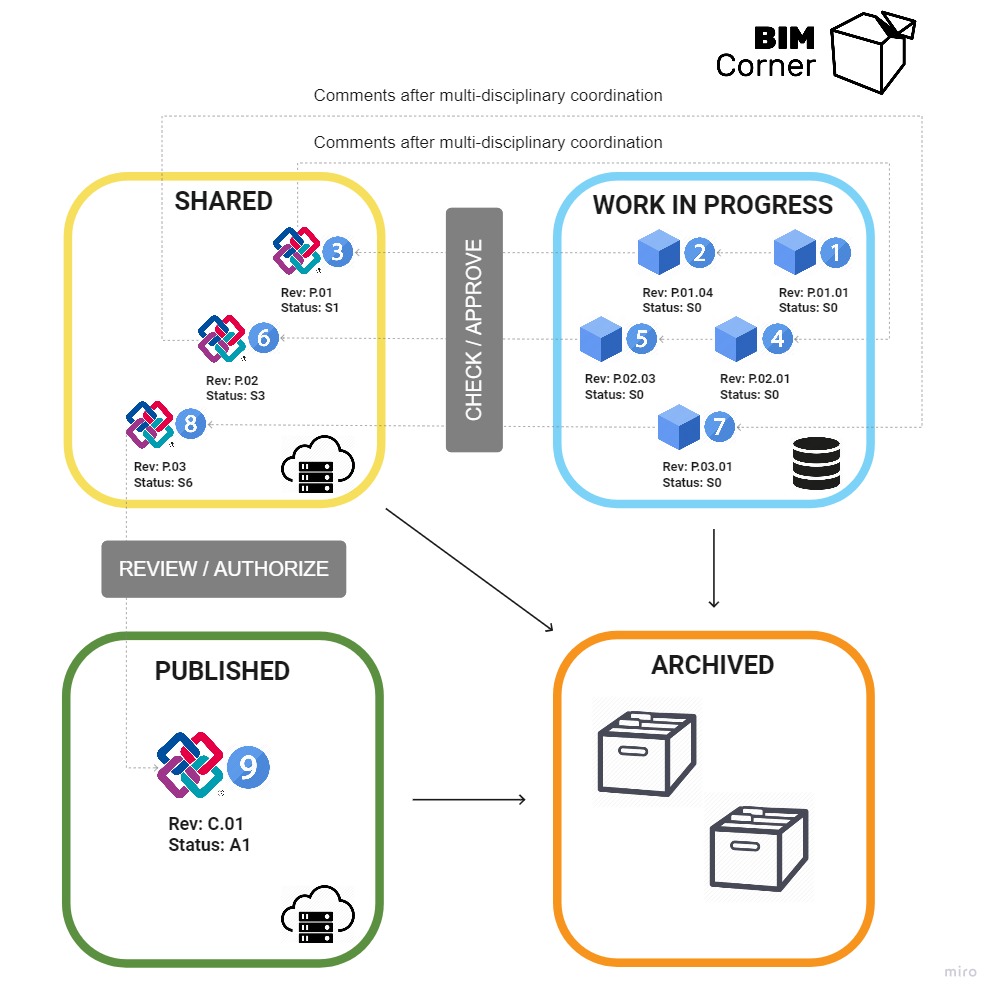
1) Information States (Where Work Lives vs Where Truth Lives)
Teams fail when they have folders in the project without shared meaning. People upload files, but nobody knows what each area is for, so everyone invents their own rules under pressure.
Fix that first. Define the states and boundaries:
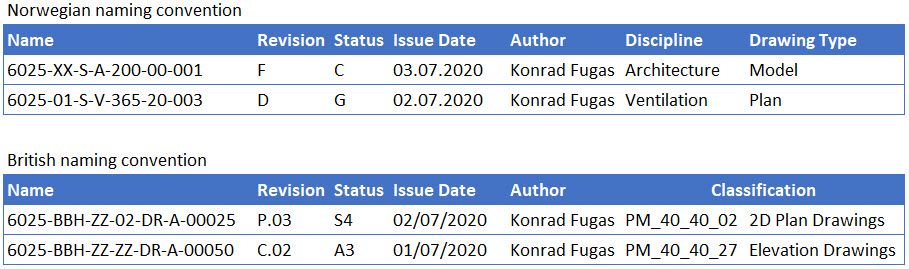
- WIP is for working. Drafts and iterations live here. It is not a coordination source.
- Shared is for coordination. It is where teams exchange work to align. It is not the final record.
- Published is the official record. If something is contractual, issued, or “safe to build from,” it lives here.
- Archive is history. It exists for traceability, not daily work.
Call them whatever you want internally.
“Shared” can be referred to as “Coordination”, and “WIP” can be referred to as “Current Design”.
The names do not matter. The meaning does.
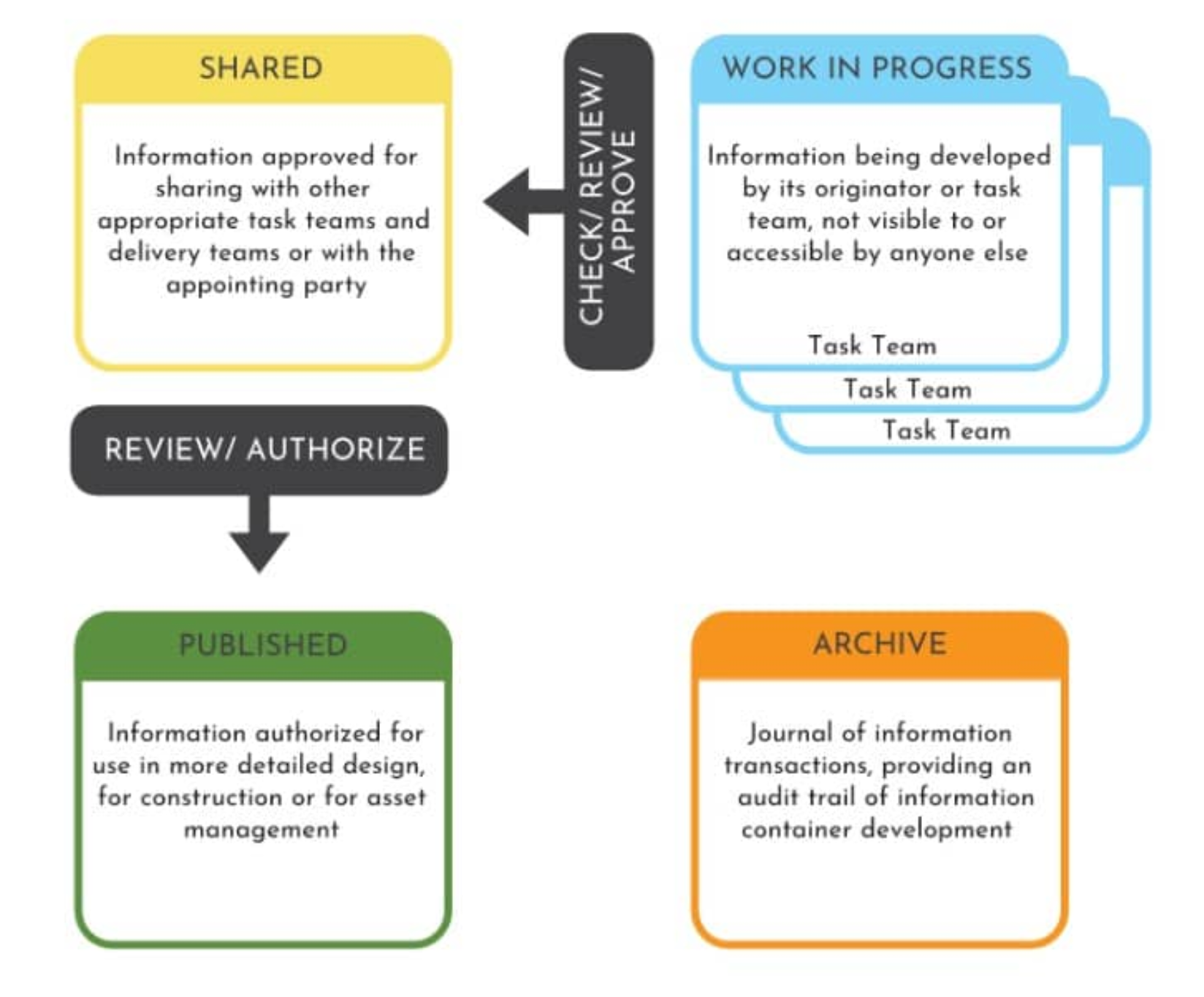
2) Naming and Metadata (Make Finding Predictable)
If every project names files differently, people stop trusting the platform. Then they ask. Then they duplicate. Then they build local “final” folders.
Naming doesn’t need to be perfect. It must be consistent enough that anyone can quickly tell:
what it is, who created it, what package it belongs to, what revision it is, and what state it is in.
A “minimum viable” standard is enough at the start.
The goal is predictability, not elegance.
3) Permissions (Protect the Truth)
SSOT collapses if anyone can overwrite or edit official information.
Permissions are not just security. They are workflow control. They prevent accidental chaos and they stop the “Published” area from becoming a shared drive with branding.
A simple principle works well:
- People can create and edit freely in their own areas in WIP
- Teams can collaborate in Shared
- Published is protected and intentional. Only authorized roles can publish or issue externally.
If Published is editable by everyone, it stops being truth.
4) Release Rule (How Information Becomes Official)
This is the missing piece in most companies.
SSOT is “we have a clear rule for how information becomes official, and we follow it.”
This is the moment where real decisions happen:
Is the information still draft, or ready for coordination?
Is it coordinated and ready to be issued?
Is it safe for the client or contractor to use?
If you do not define this, releases happen through shortcuts: email approvals, Teams messages, verbal “looks ok,” and local copies. That instantly breaks SSOT.
You do not need a heavy process to start. Even a lightweight rule works:
Published is only updated when the package is complete and intentionally issued.
Later you can implement this properly inside Forma using Reviews/Approvals + Transmittals. But the mindset starts now: anything released to the outside world must be reviewed and approved in a traceable way.
Look at the graphic below. Information moves from one state to another, for example, from WIP to Shared, only after it has been checked and approved. 👇
This is where the Review / Approval tool in Autodesk Forma is used to verify the quality of the information and approve it for transition to the next state.
Mistake #2: Training on Clicks Instead of "Why"
Most CDE training focuses heavily on software features.
Companies hire external specialists who spend days demonstrating the user interface, showing people where to click, how to upload files, and how to open a review tab.
Then, they assume people will change a decade of working with emails and local drive habits overnight.
Why Button-Clicking Tutorials Fail
Training is not the same as adoption.
Feature-based training ignores the psychological side of change.
Under deadline pressure, people don’t care about software features; they care about “survival :)” about “getting work done”.
If they don’t understand why controlled states matter, or how local copies destroy the project’s single source of truth, they will default to what they trust: their local hard drive
Shift to Role-Based Scenarios
Instead, you need to train by role, not by features.
A project manager needs different coaching than a site engineer or a BIM coordinator. Frame the training around real-life project scenarios rather than software menus. For example, instead of teaching how to use the upload tool, show them:
“We just received client comments on Package A. Here is how we process them, how we link the decision to the model record, and how we prove the final response is official.”
Appointing Your Information Guardians
Furthermore, don’t try to change everything at once. Pick two or three non-negotiable rules, like “no local copies for design models”, and reinforce them relentlessly for the next four weeks.
To make it stick on the ground, nominate an “Information Guardian” or champion within each delivery team. You don’t need a global admin sitting in a distant corporate office; you need someone in the trenches who can protect the rules and help colleagues when the pressure peaks.
Final thought
Autodesk Forma gives your team the capability to organize project data brilliantly, but it cannot force human discipline. CDE rollouts don’t fail because people want to break the rules; they fail because the deployment allows old habits to remain an easier option.
By defining your process first, shifting your training from software clicks to human workflows, you stop treating the CDE as an optional software trial.
You turn it into the undeniable, trusted foundation of how your projects get built.
If you want to stop fighting old habits and finally turn your CDE into an operational powerhouse, sign up for my CDE ROI Accelerator newsletter to get actionable, real-world strategies delivered straight to your inbox.
Check details here: https://cderoiaccelerator.com/
Thanks for reading!

If so, I am pretty sure you will like my CDE ROI Accelerator Newsletter.
Every Tuesday, I’ll send you practical insights that help reduce waste, errors, and delays caused by messy project information.