A BEP (BIM Execuction Plan) requirement is not useful if nobody can clearly check it.
In this article I want to talk about a practical skill that saves BIM Coordinators a lot of time. It is the ability to turn requirements from the BEP or EIR into rules that produce a clear pass or fail result.
This matters because many teams think they already have BIM requirements on their project, but in practice they only have broad statements that create confusion. Once you learn how to rewrite those statements into checkable rules, coordination becomes easier to run, easier to explain, and much easier to repeat.
Let’s talk about it a bit deeper.
The real problem is not missing checks. It is non-checkable requirements.
A lot of coordination pain starts before clash detection.
It starts in the way requirements are written.
Most of us have seen statements like “the model must be correctly created” or “elements must be properly named according to standards.” These sound reasonable inside a BEP, but they are not useful enough for checking. They do not tell you what objects are included, what exactly must be true, how strict the rule is, or what evidence proves the result.
So the team ends up doing discussion-based coordination instead of check-based coordination.
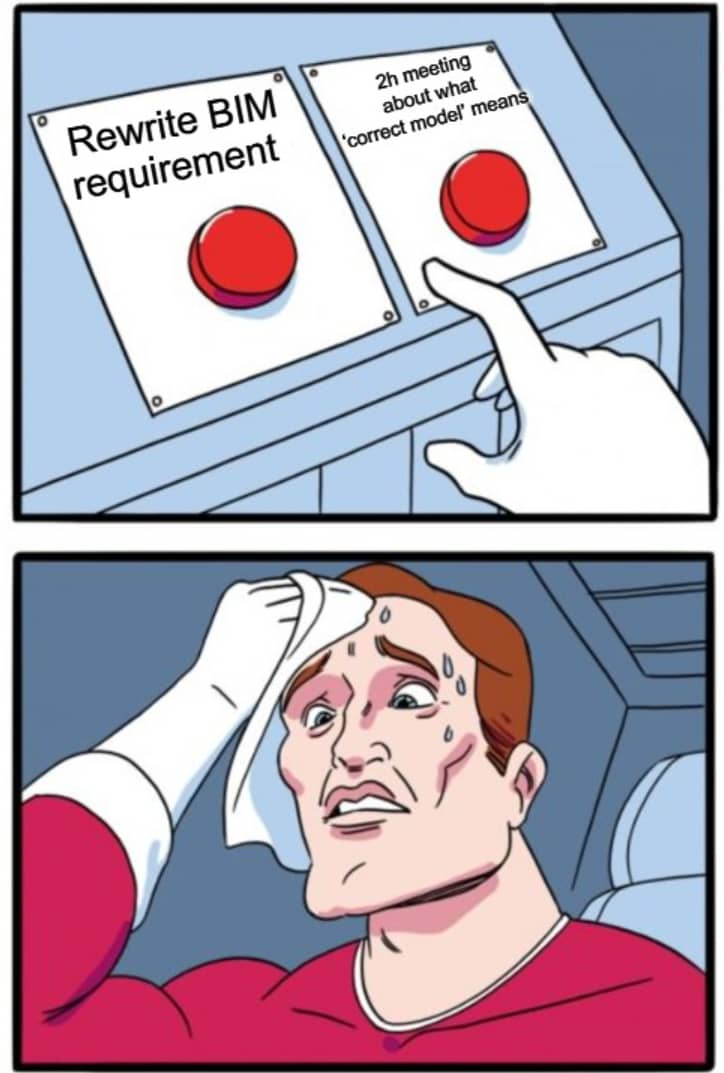
This is why so many coordination meetings feel longer than they should.
When a requirement is vague, every discipline fills the gap with its own interpretation.
That is when the same issue gets discussed again and again. One person says the model is fine. Another says it is not compliant. A third person asks what “compliant” actually means in this case. The problem is not always the model. The problem is often the wording behind the check.
Ambiguity creates rework, weak accountability, and low trust in the checking process.
#1 - The first mistake is starting with the parameter instead of the purpose.
Many people jump directly to “Which property should we check?”
That feels practical, but it is often too early.
A better starting point is a simpler question.
– Why do we need this information at all?
– Who will use it?
– and what decision depends on it?
This matters because if you skip purpose, you often create checks that produce noise instead of value. Teams start checking detailed information too early, or checking things that are not needed yet for the current stage. Then the results become heavy, the design team gets overloaded, and the checking process loses credibility.
Before you write a rule, clarify the context. Who needs the result, at which stage, and for which deliverable (native model, IFC, naming requirement, report, or something else). This one step already removes a lot of friction.
#2 - The second mistake is treating one BEP statement as one check.
This is one of the biggest reasons people struggle.
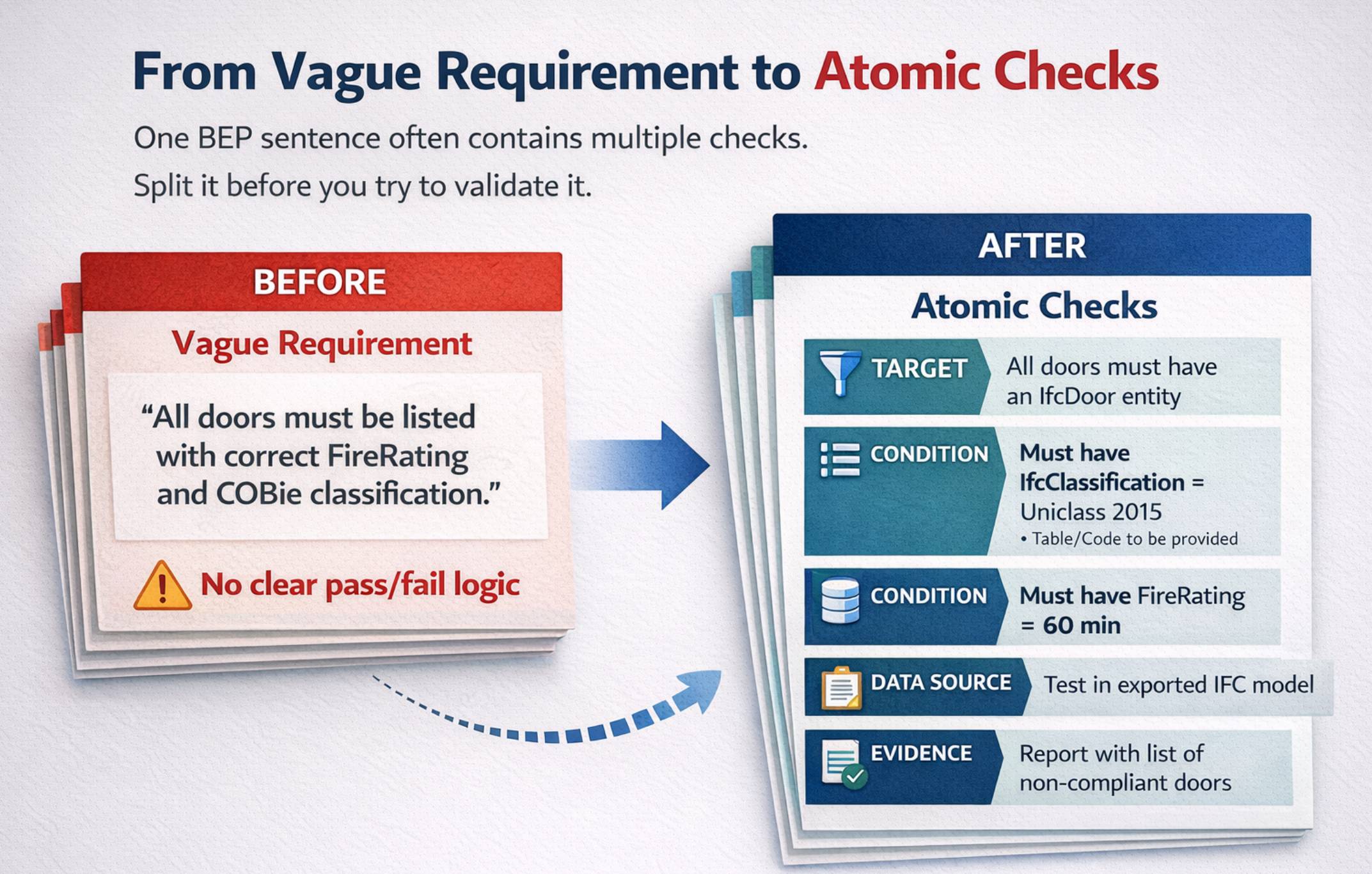
A requirement in a BEP or EIR is often too broad to become a single test. It looks like one sentence, but inside that sentence there are multiple conditions.
Take a requirement like this: “Door information must be complete and follow project standards.”
That may sound like one requirement, but it usually contains several separate checks. You may need to check whether a required property exists, whether it is filled in, whether the value matches an allowed list, whether classification is present, and whether the data appears correctly in the deliverable.
In other words, one requirement statement often needs to be split into atomic checks.
This is not overcomplicating the process. It is what makes the process possible.
#3 - The third mistake is mixing information checks and geometry checks.
They are related, but they are not the same thing.
Information checks focus on things like properties, classification, naming, or other alphanumeric requirements. Geometry checks focus on intersections, penetrations, and clearances. Delivery checks focus on what is actually being issued, such as naming and export-related expectations.
For information requirements, IDS – Information Delivery Specification, can be a very useful way to formalize what must be present and how it should be structured in delivered model data. It is a strong fit for information checks, but not for geometry checks such as clashes or clearances.
This is why the first step is still the same: define the requirement as a clear checkable rule first, then choose the right checking method.
The mistake happens when teams try to use one mindset for everything. Then they choose the wrong checking method, expect the wrong type of output, and get frustrated when the result does not answer the real question.
A simple way to stay out of trouble is to first decide what kind of requirement you are looking at. Only then choose how to check it.
So here is how to fix it.
Use a repeatable rewrite workflow every time you work with BEP or EIR requirements.
Step 1. Extract the requirement into a working table.
Do not try to run checks directly from a PDF paragraph.
First, move the requirement into a simple working table that you can manage. This changes the work from reading to execution.
A practical row can include the requirement ID, the original text, the relevant stage or milestone, the deliverable, and the likely check type. You are not building a perfect system here. You are building a place where the requirement can be translated into something testable.
This step also improves team communication because people are discussing one line in a table, not arguing over a long paragraph in a document.
Step 2. Run a quick checkability test before writing the rule.
This is where many future problems can be prevented.
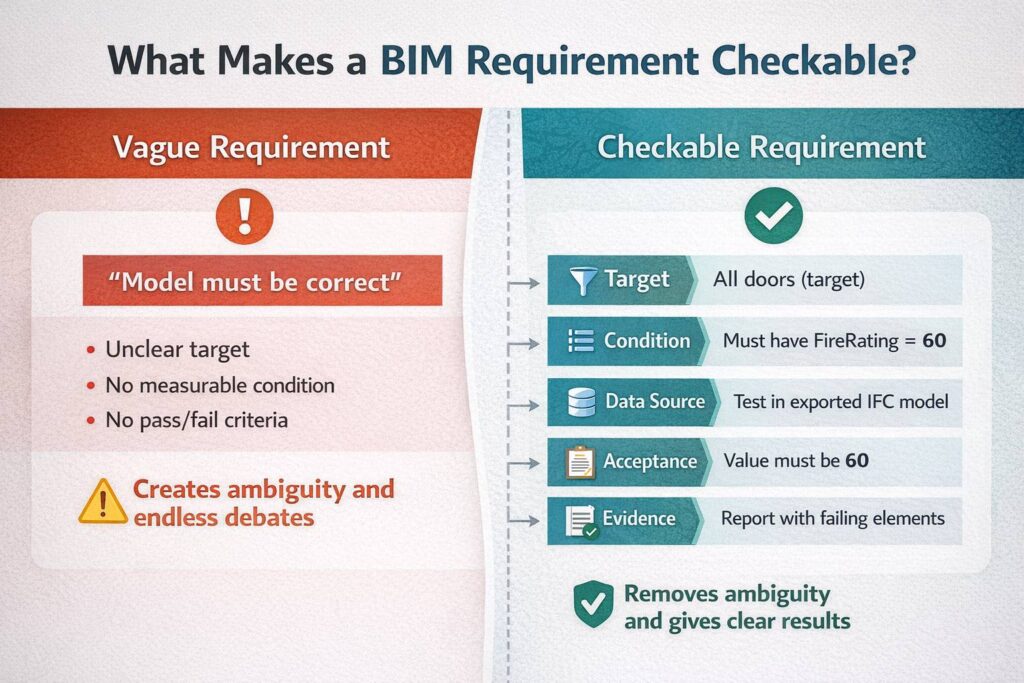
Before you write the check, ask whether the requirement already contains the minimum ingredients needed for pass or fail. If even one part is missing, you are not ready to define the rule yet.
Use a short test like this:
- What is the target (which objects or files are we checking)?
- What is the condition (what must be true)?
- Where does the data come from (native model or IFC)?
- What is the acceptance criteria (including units, tolerance, allowed values if needed)?
- What evidence should the check produce?
If you cannot answer these clearly, the requirement may still be valid as an intention, but it is not checkable yet. It needs rewriting first.
Interactive BIM Coordination guide full of tips, graphs, mind maps, and practical exercises. It will teach you the basics of BIM Coordination. All for free.
Step 3. Rewrite broad requirements into atomic rule statements.
This is the point where the process becomes much easier.
You do not need to invent a new sentence style every time. Reuse a few simple patterns and apply them consistently. For example:
1. One rule pattern may define that all target objects must have a specific property with an allowed value or range.
2. Another pattern may define that no object from set A may intersect set B beyond a defined tolerance.
3. Another may define naming or classification expectations.
The point is not to sound formal. The point is to make the rule readable and testable. When your rule statement is clear, the check is easier to configure and the result is easier for the design team to understand and execute.
Step 4. Decide where the truth lives.
This is a small step, but it prevents many painful conversations later.
A value can exist in the authoring model (in tools like: Revit, ArchiCad, Tekla etc.) and still be missing in the IFC that is exported as deliverable. That means a team can think they are compliant when the delivered IFC file is not.
So for each rule, decide where the check should happen. Is it a native-model check, an IFC check, or both?
If the deliverable requirement is tied to IFC, then checking only the native model is often not enough. You need to verify the delivered output too. This is especially important when export of IFC or mapping of parameters and IFC classes can change what appears in the file.
Step 5. Make acceptance criteria explicit.
This is where many checks look correct on paper and still fail in practice.
A rule is not complete until the acceptance criteria is clear.
For information checks, this can mean allowed values, syntax – patterns, required completeness, or what counts as missing.
For geometry checks, this can mean the type of geometric condition and the tolerance with units.
Without this, two people can read the same requirement and apply different standards. Then the team thinks the software is inconsistent, when the real issue is the requirement was never fully defined.
Step 6. Define evidence before you run the check.
A red result in a checking tool is not the final output.
The final output is a result that another person can act on.
That means the evidence should clearly show what rule failed, which version was checked, which elements are affected, where the issue is located, and what should be fixed. If your check result cannot answer those questions, the team will still need a meeting just to understand the issue.
At that point, the checking process is not saving much time.
This mindset shift is what improves coordination quality.
You are not just running checks. You are building a small test system around project requirements.
That system has defined rules, defined timing, and defined evidence. It also makes re-checking much easier, because the logic is already written down and doesn’t depend on memory or personal interpretation.
This is one reason good BIM Coordinators look calm and confident in complex projects. They aren’t trying to remember everything in meetings. They are relying on structured checks.
One more practical point. Not every valid requirement should be checked now.
Some requirements are correct, but not active yet.
That doesn’t mean lowering standards. It means sequencing the standards.
If a requirement belongs to a later stage, keep it in your plan and activate it when the project reaches the right milestone. This reduces unnecessary noise and helps the team focus on what matters now.
In practice, this is one of the simplest ways to protect trust in the checking process.
Final thought
The biggest win isn’t that you create more rules. The biggest win is that you create fewer arguments during the coordination process.
When requirements become checkable, coordination becomes clearer, faster, and more repeatable across teams and projects.
If you’re working with BEP or BIM requirements and want to develop in this area, you might find my BBC program interesting.
Check the details here: https://becomebimcoordinator.com/
Thanks for reading!

If so, I am pretty sure you will like my BIM Coordination Newsletter.
Every Wednesday, I go deeper into various BIM Coordination/Management topics, share tips, practical materials, and help professionals become better BIM Coordinators.