
“It’s a continuation. Most of the requirements stay the same. Should be quick.”
That’s what we told ourselves at the start of phase two on the New Stavanger University Hospital. The requirements were mostly written, we just had to adjust them for lessons learned. Easy.
It wasn’t. Adjusting them turned into a full property audit, changes to the shared parameters file across every discipline, hunting duplicates, fixing the naming convention, untangling conflicting logic, and long feedback loops with every stakeholder. Two full weeks of cleaning, and that was with a solid starting point. Without proper templates, add another two.
If that feels familiar, good. It means you’ve lived it too. It’s normal BIM life on a big project.
Except that document, the one that ate two weeks, is something your model checker can’t read. Not the Excel. Not the PDF. Nothing. So before you validate a single model, somebody has to translate those requirements one more time, into the only language a checker understands. It’s called IDS. And doing that by hand is the most mind-numbing job in the chain.
This post is about handing that job to AI.
What is IDS - and why Excel or a PDF won't cut it
Two quick definitions, because the whole post hangs on them.
A LOIN (Level of Information Need) is the list of what data each object must carry, and when. Fire rating on doors, load-bearing status on walls, a classification code on every object. It's written for people, usually an Excel table or prose buried in an EIR. Readable. Sensible. Useless to a computer.
IDS (Information Delivery Specification) is the buildingSMART open standard that writes those same requirements in a format a checker can run. It says "this IFC class must carry this property, with this value," so any IDS-capable tool, like Solibri or usBIM, can enforce it automatically. If you want the longer version, here's more on what IDS is and how it works.
So the job is simple to describe. Take requirements a human wrote and turn them into IDS a computer reads.
Simple to describe. Painful to do.
Why turning a LOIN table into IDS is so painful
Requirements speak one language: plain description. Sometimes more detailed, sometimes less, and every project has its own tone and layout.
IDS speaks another: a rigid structure defined by an XML schema. Nested tags, sharp brackets.
Now, normally on a project we have LOIN tables with several hundred requirement rows.
You feel the pain already? No?
So let me tell you, that IDS editors don't have (yet) any bulk imports. No copy paste. No easy translators.
Now picture it.
Clicking through options for EVERY SINGLE REQUIREMENT. And to specify one requirement you need at least 7 mouse clicks and 5 fields to write value (counted).
I'm dead inside only by writing about this.
So you think, fine, I'll write the XML by hand. Copy the template, fill in what I need.
Tried that too. Nested tags inside nested tags inside nested tags. One bracket in the wrong place and the whole file is invalid. Do that for a few hundred parameters and it eats a full day, bores you senseless, and you still end up with three typos hiding in there.
The data side of BIM
Practical AI and BIM workflows. The LOIN to IDS pack comes with the first email.
The fix: let AI write the XML
You should not be hand-writing XML in 2026. The machine can do it.
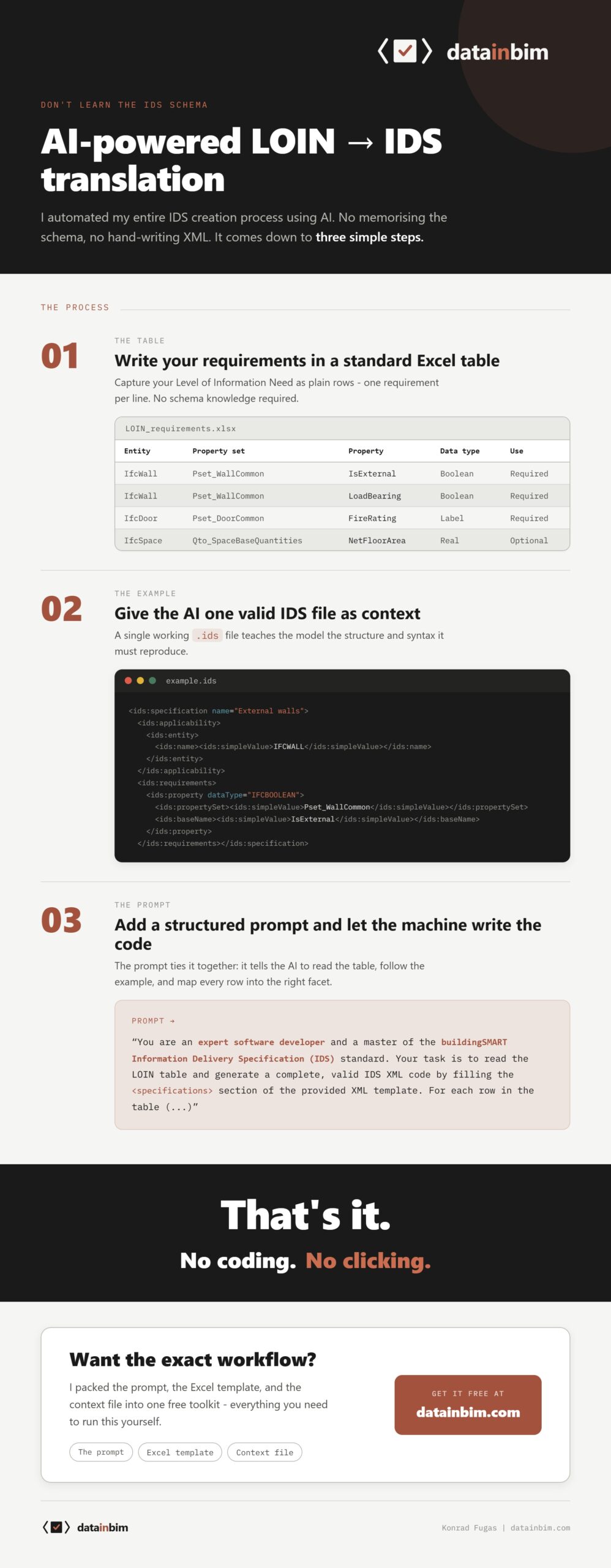
So I built an AI-powered LOIN to IDS Translator. You take the requirements the owner sent you in Excel, paste them into a normal AI chat with a prompt I’ve already written, and you get an IDS file back. One that loads into an IDS editor with no error. About five minutes to the first result.
Here's what that translation looks like for a single requirement.
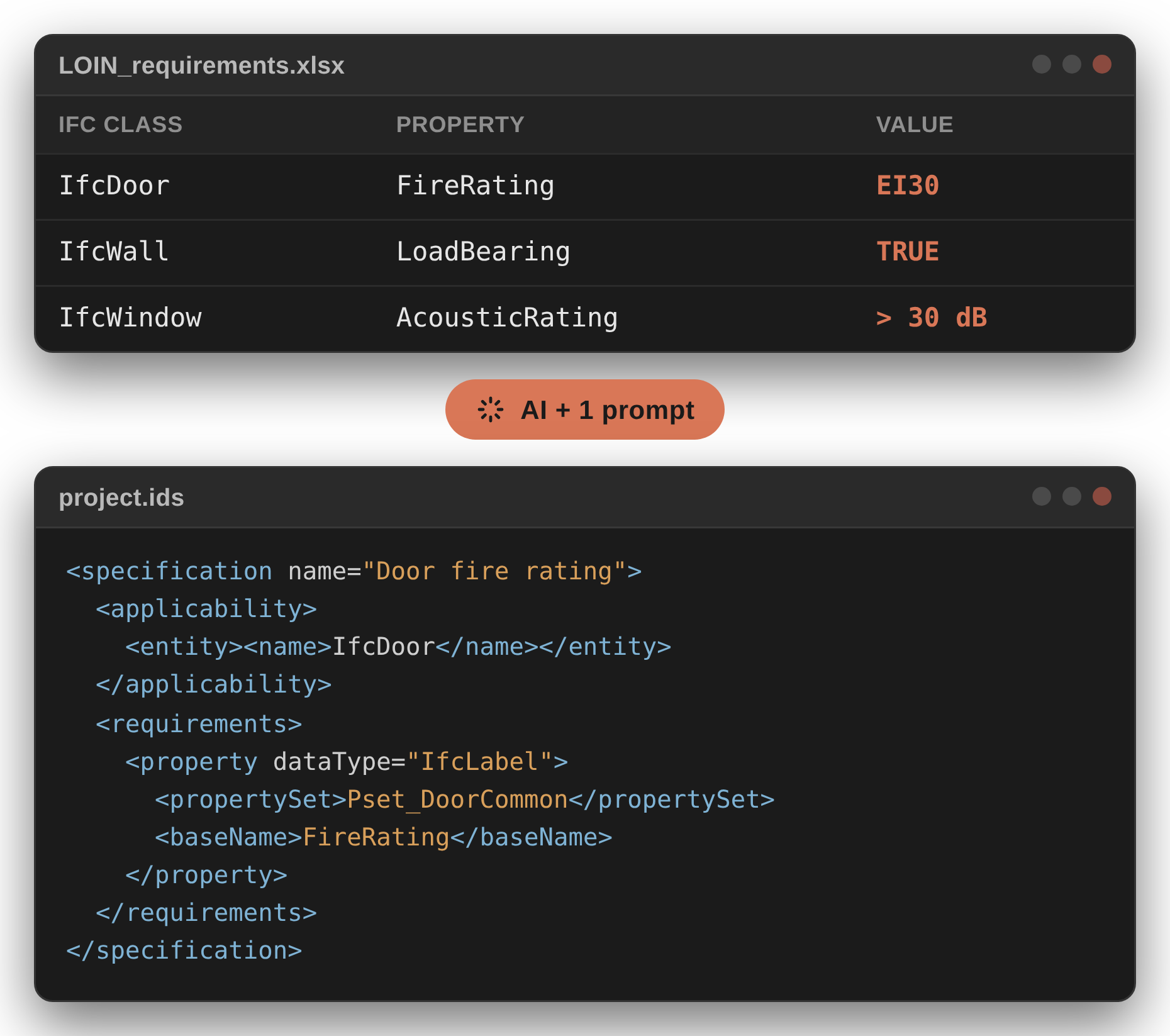
You write one plain row in a table:
| IFC Class | Property Set | Property Name | Restriction |
|---|---|---|---|
| IfcWall | Pset_WallCommon | FireRating | 30 MIN, 60 MIN, 90 MIN |
The AI turns it into this:
<ids:specification ifcVersion="IFC4" name="Wall fire rating">
  <ids:applicability minOccurs="1" maxOccurs="unbounded">
    <ids:entity>
      <ids:name><ids:simpleValue>IFCWALL</ids:simpleValue></ids:name>
    </ids:entity>
  </ids:applicability>
  <ids:requirements>
    <ids:property dataType="IFCLABEL" cardinality="required">
      <ids:propertySet><ids:simpleValue>Pset_WallCommon</ids:simpleValue></ids:propertySet>
      <ids:baseName><ids:simpleValue>FireRating</ids:simpleValue></ids:baseName>
      <ids:value>
        <xs:restriction base="xs:string">
          <xs:enumeration value="30 MIN" />
          <xs:enumeration value="60 MIN" />
          <xs:enumeration value="90 MIN" />
        </xs:restriction>
      </ids:value>
    </ids:property>
  </ids:requirements>
</ids:specification>
One readable line becomes twenty lines of nested tags. Now multiply that by a few hundred rows, and you understand why nobody does it by hand.
Two blocks do the work here. The applicability block says which objects the rule catches (every IfcWall). The requirements block says what they must carry (a fire rating from the allowed list).
Why it works (and why a prompt alone isn't enough)
There's a lot of hype around AI, in our branch and everywhere else. So let's be honest about what it's good at.
AI can't create a Revit model. It can't design for you, it can't check the building, and it obviously can't build it. But it's very good at two things: reading written text, and structuring data.
What is an EIR? Written text.
What is IDS? A structured data schema.
Bingo.
Now, a fair question. If it's just "ask ChatGPT to write me some IDS," why do you need a pack from me at all?
Because I tried exactly that, and the AI gave me confident rubbish. It invented property sets that don't exist. It made up restriction bases. It produced XML that looked perfect and failed the moment I loaded it.
The trick isn't the prompt on its own. It's the context you give the AI alongside it. A few real, valid IDS files that show it what correct looks like, plus an empty template with the exact structure to fill in. With that context in the chat, the model stops guessing. I tested the same setup on Claude, ChatGPT and Gemini, and all three return valid IDS when you feed them the context files.
That's what makes it more than a clever prompt. It's a prompt plus the guardrails that stop the AI wandering off.
How to convert LOIN to IDS in three steps
The whole thing is genuinely this short.
Step 1 - Fill the LOIN table
Everything starts in a LOIN table. One requirement per row. IFC class, property set, property name, and the value or restriction. If you can fill in a spreadsheet, you can do this. The pack comes with a filled example, ten requirements already solved, so you can see what good looks like before you touch your own.
Step 2 - Run the prompt
You open Claude or ChatGPT. You paste the prompt from the pack, upload your table and attach the context files. Then you hit go and watch it write the XML you did not want to write. Every row in your table becomes one specification in the file. The prompt tells the AI exactly how IDS is built, so it fills the structure instead of inventing it.
Step 3 - Check the output (never skip this)
You save the result with a .ids ending and load it straight into IDS editor of your choice (I recommend usBIM since it is best at handling errors). If it opens with no parser error, the structure is sound. Then you glance at a couple of property names against the IFC documentation, because the AI will now and then invent a property that sounds perfect and does not exist.
Table, prompt, check. XML you never had to touch.
The honest part: one prompt is not a process
I don't want to oversell this, because I have been burned by tools that do.
Two things you need to hear.
First, AI still hallucinates. That's why step 3 isn't optional: a made-up property that looks right will pass quietly until Solibri chokes on it. Two minutes of checking beats an afternoon debugging a silent error later.
Second, one prompt does not solve your project. The translator handles clean requirements, a tidy table with native properties. Real EIRs don't arrive tidy. They arrive as fifty pages of prose, conditional rules like "acoustic 40 dB in the meeting rooms, 30 in the offices" parameters nobody bothered to define. Turning that mess into a clean table, mapping vague words onto native IFC classes, and then automating the checks so they run overnight instead of you clicking Solibri on a Friday afternoon, is a much bigger job. One prompt won't get you there. A process will.
What's next: the messy EIRs (and a free webinar in September)
That process is what I'm building right now. Step by step, how to work with AI on this without handing your judgement to a black box. The goal is a good result for the least amount of manual, boring work. Not AI writing your requirements for you, but AI doing the dull translation while you stay in control and check the parts that matter.
I spent five years owner-side on the New Stavanger University Hospital building requirement databases, so I know where the mess hides and where AI actually earns its place. I'm running a free webinar on the full path in September. If the messy EIR is the wall you keep hitting, that is the session to be in.
Get the free LOIN to IDS Translator
For now, the LOIN to IDS Translator is free on datainbim.com. It already saves you hours on the clean cases. Try it on your own requirements and tell me what breaks. I read every reply.
👉👉 Download it free here: datainbim.com
FAQ: LOIN, IDS and AI
What is the difference between LOIN and IDS?
A LOIN (Level of Information Need) is the human-readable list of what data each object must carry, usually an Excel table or text in an EIR. IDS (Information Delivery Specification) is the machine-readable version of those same requirements, an open buildingSMART standard that a checker like Solibri or usBIM can run automatically. LOIN is what people write. IDS is what the software reads.
Can ChatGPT write IDS files?
Yes, but not reliably on its own. Ask a chatbot for IDS with no guidance and it will invent property sets and restriction bases that look right and fail on load. It gets reliable when you give it context: real, valid IDS files and an empty template to fill. With that, Claude, ChatGPT and Gemini all return valid IDS.
Do I need to know how to code to create an IDS file?
No. If you can fill in a spreadsheet, you can create an IDS file with the LOIN to IDS Translator. You write your requirements as rows in a table, the AI writes the XML, and you check the result in an IDS editor. You never touch a line of XML.
How do I check an AI-generated IDS file is correct?
Load it into the free usBIM IDS Editor. If it opens with no error on the bottom, the structure is sound. Then check a couple of property names against the IFC documentation, because AI can invent a property that doesn’t exist.
How long does it take to convert a LOIN table to IDS?
About five minutes to the first valid file for a clean table. The manual alternative, clicking through an IDS editor or writing XML by hand, takes the better part of a day for a few hundred requirements.
The data side of BIM
Practical AI and BIM workflows. The LOIN to IDS pack comes with the first email.