

Ask five BIM people what an IFC concept is and you get five different answers. Or a polite silence.
Yet IFC 4.3 is built out of concepts, 99 of them. And everything that decides whether your file is accepted speaks their language: the client’s requirements, the official model views and IDS.
This is a short introduction for people who deliver IFC for roads, rail and bridges. What a concept is, shown on one real bridge pier. How many there are. Which ones the official views ask for. And how many of them an IDS can actually check. That last number surprised me.
| What | Concepts |
|---|---|
| IFC 4.3, in total | 99 |
| Alignment-based View (official MVD for infrastructure) | 64 |
| Reference View (official MVD for coordination) | 51 |
| IDS 1.0 can check fully | 22 (+10 partly) |
| In no official view | 35 |
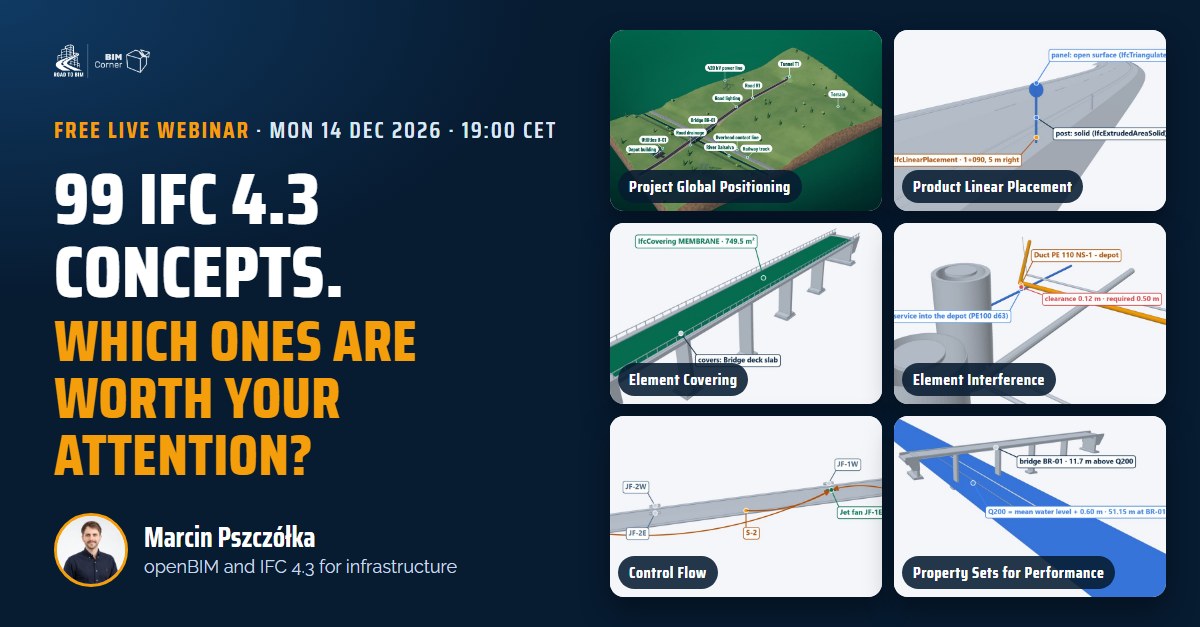
This article is the warm-up for my free live webinar 99 IFC 4.3 concepts: which ones are worth your attention? on Monday 14 December, 19:00 CET. Save your seat here.
1 · One pier, 18 concepts
Take pier wall P1 of bridge BR-01 from our IFC 4.3 demo corridor. In a viewer it is a grey concrete wall. In the file it starts as one line:
#252=IFCCOLUMN('0orICgdHPSlR49FPc2z3O2',#7,'Pier wall P1','Pier wall - Pier P1',$,#234,#251,'PW-P1',.PIERSTEM.);This line gives you the class, the name, the tag and the fact that it is a pier stem. Everything else the client wants to know lives in other lines that point to #252. What is it made of? Which part of the bridge does it belong to? Which drawing, which task in the schedule, which cost item?
For each of those questions IFC 4.3 has one fixed pattern for the answer. That pattern is a concept.
An IFC concept is the agreed way to write one kind of information into an IFC file: which entities, which relationship, which attributes, in which order. One question about an object, one concept. Every program that follows it writes the answer the same way, so every program that reads the file knows where to look.
Here is one concept in full. The question: where does the pier belong? The concept: Spatial Containment. The answer always has the same pattern: one relationship, the elements in a list, the spatial element at the end.
#4897=IFCRELCONTAINEDINSPATIALSTRUCTURE('2_OacXNyD4bhocbiOgh69Z',#7,'Contents of P1',$,(#252,#2842,#2921,#3006),#76);
#76=IFCBRIDGEPART('2$$aENSZ9R_A5dHZe7cQme',#7,'P1',$,$,#75,$,'Pier P1',.ELEMENT.,.VERTICAL.,.PIER.);
The pier, its pad footing, the blinding concrete and the crushed stone bed are contained in bridge part P1, of type PIER. Not in a building storey, not in a layer name, not in a property somebody typed in. More on that in Your road is living in a building storey.
I followed every line that points to #252 and counted the concepts. One pier carries 18:
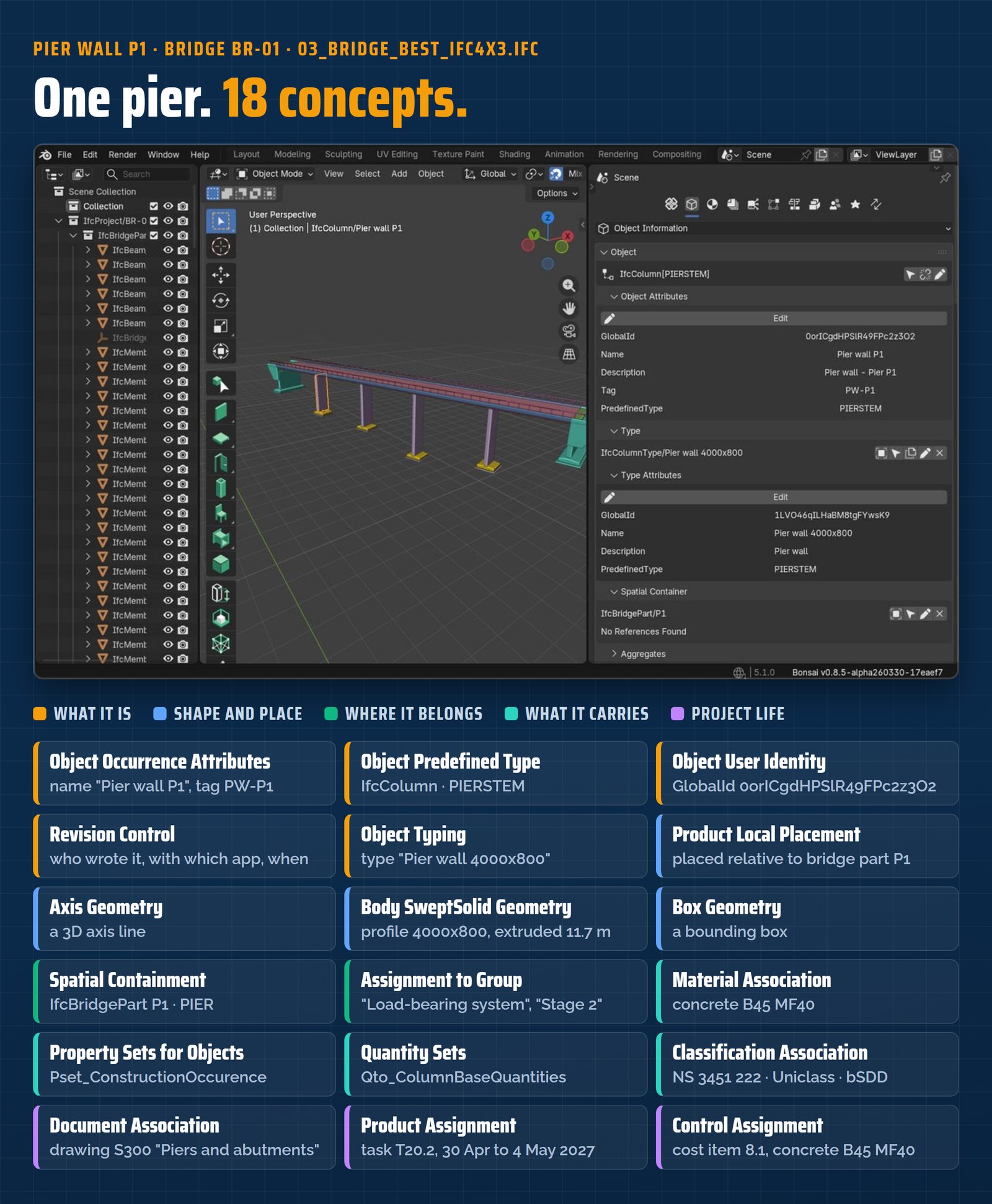
03_Bridge_BEST_IFC4x3.ifc.Look at the last group. The drawing, the construction task with its dates and the cost item sit on the pier as well. Keep them in mind. They come back in section 5.
2 · 99 concepts in eight groups
buildingSMART documents the concepts of IFC 4.3 as concept templates, sorted into groups. Here they are, with an example from the same pier:
| Group | Concepts | On our pier, for example |
|---|---|---|
| Object Attributes | 7 | name, tag, GlobalId, owner history |
| Object Definition | 8 | type “Pier wall 4000×800”, property and quantity sets |
| Object Association | 6 | material, classification, drawing S300 |
| Object Assignment | 10 | load-bearing system, construction task, cost item |
| Object Composition | 10 | bridge BR-01, its substructure, bridge part P1 |
| Object Connectivity | 18 | contained in bridge part P1 |
| Product Shape (with Product Type Shape) | 31 | axis, extruded body, bounding box |
| Project Context | 9 | units, map conversion, EPSG:5110 |
| Total | 99 |
Two things stand out. Product Shape is the biggest group: almost a third of IFC 4.3 is about how geometry is written. And no project uses all 99. A pier needs 18. A jet fan in a tunnel needs a different set. The real question is never “which concepts exist?” It is “which ones does my exchange need?”
3 · What must a file have? Ask the MVD
A model view definition (MVD) is the buildingSMART answer to “which part of IFC, for which exchange”. IFC 4.3 has two official views:
- Reference View: the base view for coordination. Objects with their data and shape, for reference, not for editing.
- Alignment-based View: built on the Reference View, it adds what infrastructure needs.
buildingSMART keeps the list of concept templates for both views in one table in the IFC 4.3 repository. I mapped our 99 concepts onto it:
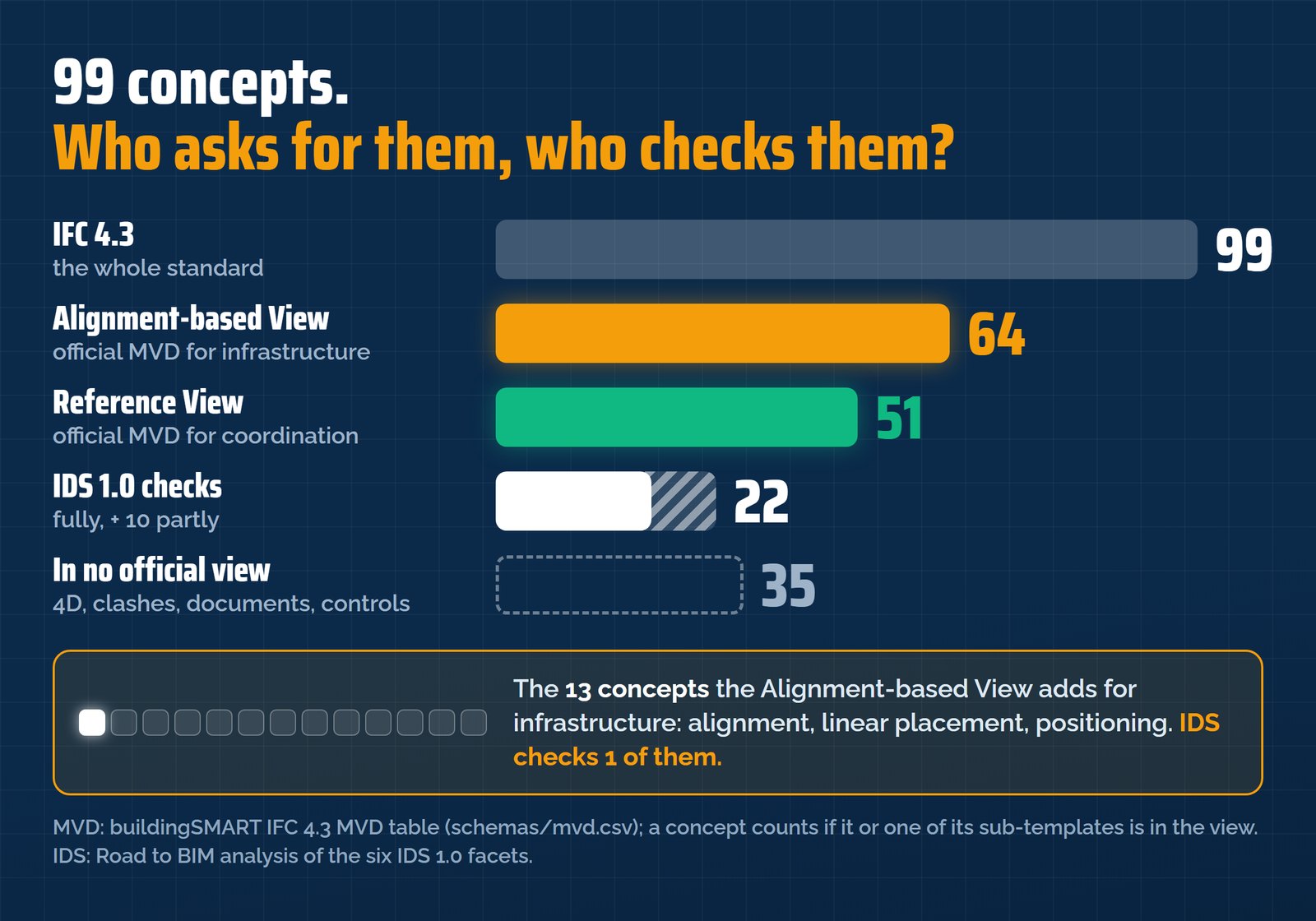
All 51 concepts of the Reference View are also in the Alignment-based View. On top of them the Alignment-based View adds 13, and they are the heart of IFC 4.3 for infrastructure:
- four alignment geometry concepts: horizontal; horizontal and vertical; horizontal, vertical and cant; segments;
- Product Linear Placement: position by station and offset;
- Alignment Aggregation To Project and Alignment Spatial Reference;
- Product Span Positioning and Product Relative Positioning;
- Spatial Interference, Profile Geometry and two surface model geometries.
Sort the concepts by project phase and the gap is hard to miss. In my phase map, 15 concepts belong to concept design and the alignment. The Reference View covers 3 of them. The Alignment-based View covers 13. If your project has an alignment, the Reference View alone is not enough.
Free live webinar
99 IFC 4.3 concepts. Which ones are worth your attention?
18 concepts on one pier and two official views are just the start. On 14 December I put all 99 on one map, give you my shortlist for infrastructure and show how to pick the right ones for your project.
Save my free seat →YouTube Live · free · the replay of our last session right after you register
4 · Who checks them? IDS sees 22
IDS (Information Delivery Specification) is how a client writes requirements that a machine can check. IDS 1.0 has been a final buildingSMART standard since June 2024. It has six facets: Entity, Attribute, Classification, Property, Material and PartOf. PartOf, the facet for “belongs to”, knows exactly six relationships.
I went through all 99 concepts against those six facets. IDS can check 22 fully and 10 partly. 67 are outside IDS.
IDS is strong where requirements sit on objects: classes and predefined types, attributes, property and quantity sets, classification, material and containment. It is blind to the alignment, placement, all geometry, 4D, clashes and most relationships.
The 13 infrastructure concepts: IDS checks one
Of the 13 concepts that the Alignment-based View adds for infrastructure, IDS can fully check exactly one: Alignment Aggregation To Project. The alignment geometry, the station and offset of a sign, the positioning of a span: IDS does not see them.
I tested one blind spot on our bridge. The deck waterproofing is an IfcCovering of type MEMBRANE, linked to the deck slab:
#11005=IFCCOVERING('2tr3fJlir0mg8enDms2$0t',#11004,'Deck waterproofing membrane',...,.MEMBRANE.);
#11025=IFCRELCOVERSBLDGELEMENTS('1MsKt3cGH3PuYpatw$sHlN',#11024,$,$,#4673,(#11005));
Element Covering is in the Reference View. Yet an IDS rule “the membrane belongs to the deck slab” fails, because IfcRelCoversBldgElements is not one of the six PartOf relationships. The model is right. IDS cannot tell.
Where IDS is blind, the free buildingSMART Validation Service has rules for exactly those topics: alignment, georeferencing, placement and geometry. What neither of them sees needs a script.
5 · 35 concepts in no official view
35 of the 99 concepts are in neither view. Among them: 4D, clashes stored in the file, documents, approvals, tunnel controls, lighting and performance data. Remember the last group on our pier? The drawing, the task and the cost item are all outside both views.
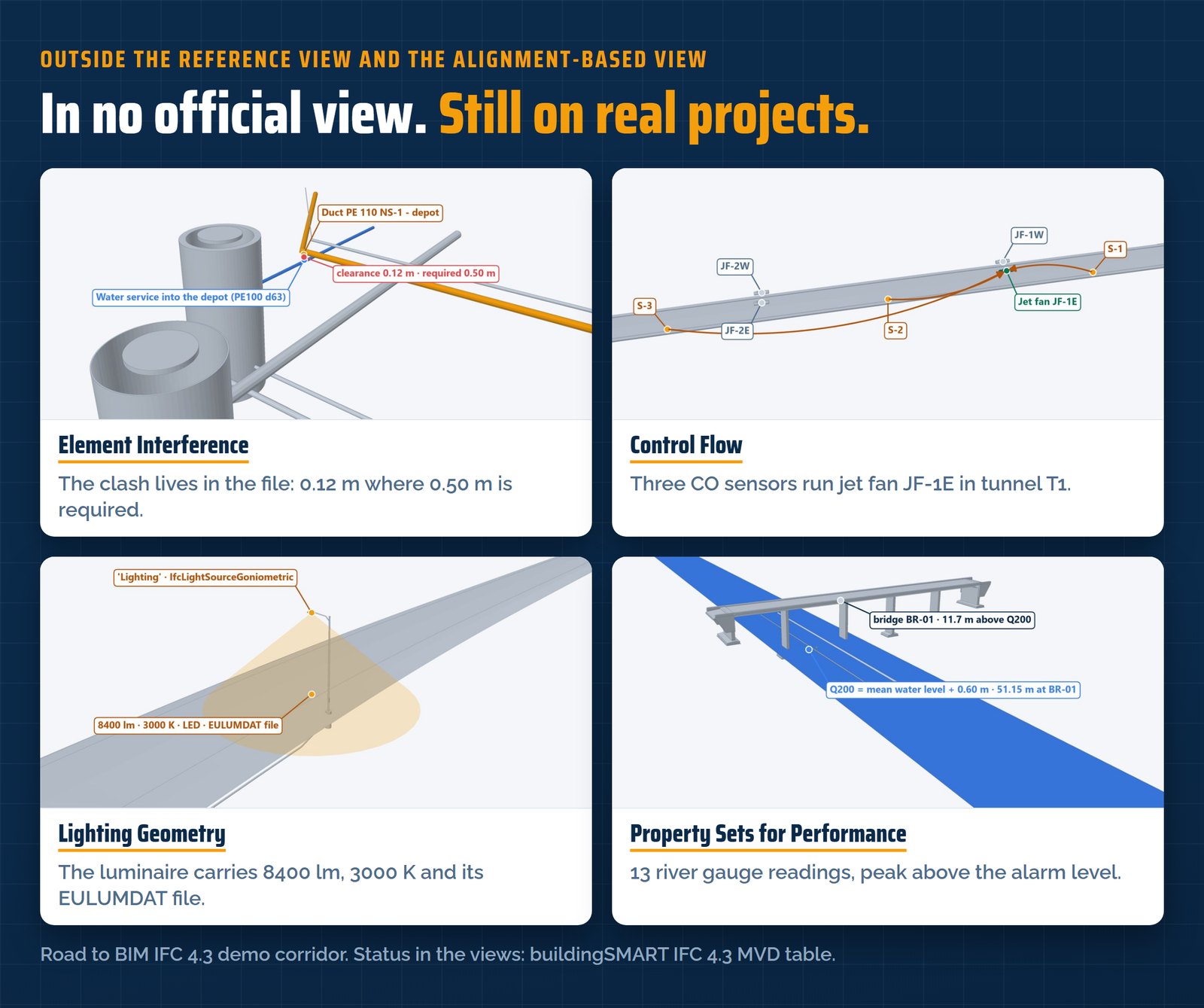
No view requires them. That does not make them unimportant. A tunnel owner will ask which sensor runs which jet fan. A contractor will want the schedule in the model. The MVD does not decide that. You decide it in your exchange requirements, project by project and phase by phase.
6 · So which ones are worth your attention?
✔ Three questions before your next IFC 4.3 delivery
- Which view? The Reference View for coordination. The Alignment-based View as soon as there is an alignment, so in almost every road, rail and bridge project.
- Which concepts beyond the view? Schedule, documents, controls, clashes. Decide them per phase, before modelling starts, not after the first rejected delivery.
- Who checks each one? IDS for the data on objects, the Validation Service for alignment, georeferencing and geometry, a script for the rest.
99 concepts, two official views, one IDS with six facets. No infrastructure project needs all 99, and most need more than any single tool can check. Knowing which concepts your project needs, in which phase and why, is the difference between a file that is valid and a file that is useful.
How I counted. MVD: the official IFC 4.3 MVD table (schemas/mvd.csv in the buildingSMART repository IFC4.x-development, branch ifc4.3-main). A concept counts as in a view if the concept itself or at least one of its sub-templates is in it. IDS: my analysis of each concept against the six IDS 1.0 facets and the six PartOf relationships, as the IDS documentation describes them and ifctester 0.8.5 implements them. The phases come from my own phase map of the 99 concepts.
Free live webinar · Monday 14 December · 19:00 CET
99 IFC 4.3 concepts
Which ones are worth your attention?
This article showed what a concept is, who asks for which and what IDS can see. On the webinar I put all 99 on one map, give you my shortlist for infrastructure from survey to operation, show what each one saves and for whom, and a simple way to pick the right ones for your next project.
One evening · one real IFC 4.3 corridor · YouTube Live · free
Register and you get the replay of my last live webinar right away: one bridge, three files and a client’s IDS.