My 65-year-old father teaches English in high school, and he prepares his lessons with support from ChatGPT. AI has moved into everyday life, and almost all of us have written a prompt by now.
But most of us still write bad ones.
Not because we don't know better. Because we're lazy. One short line, enter, and hope for the best. I tested two prompts on Claude with the same ask:
- Prompt A: "Write a naming convention for our BIM models."
- Prompt B: "Write a file naming convention for our IFC models, following ISO 19650 principles, for a hospital project with architecture, structure and MEP disciplines. Fields should include project code, originator, volume, level and revision. Present it as a table, with one example file name underneath."
Prompt A gave me a ten-chapter company standard, from family naming to governance, with a made-up project code. Then it asked me for the details it should have had in the first place. Prompt B gave me one table for a hospital and an example file name I could paste into a BEP.
Same AI, same ask on paper. Completely different result.
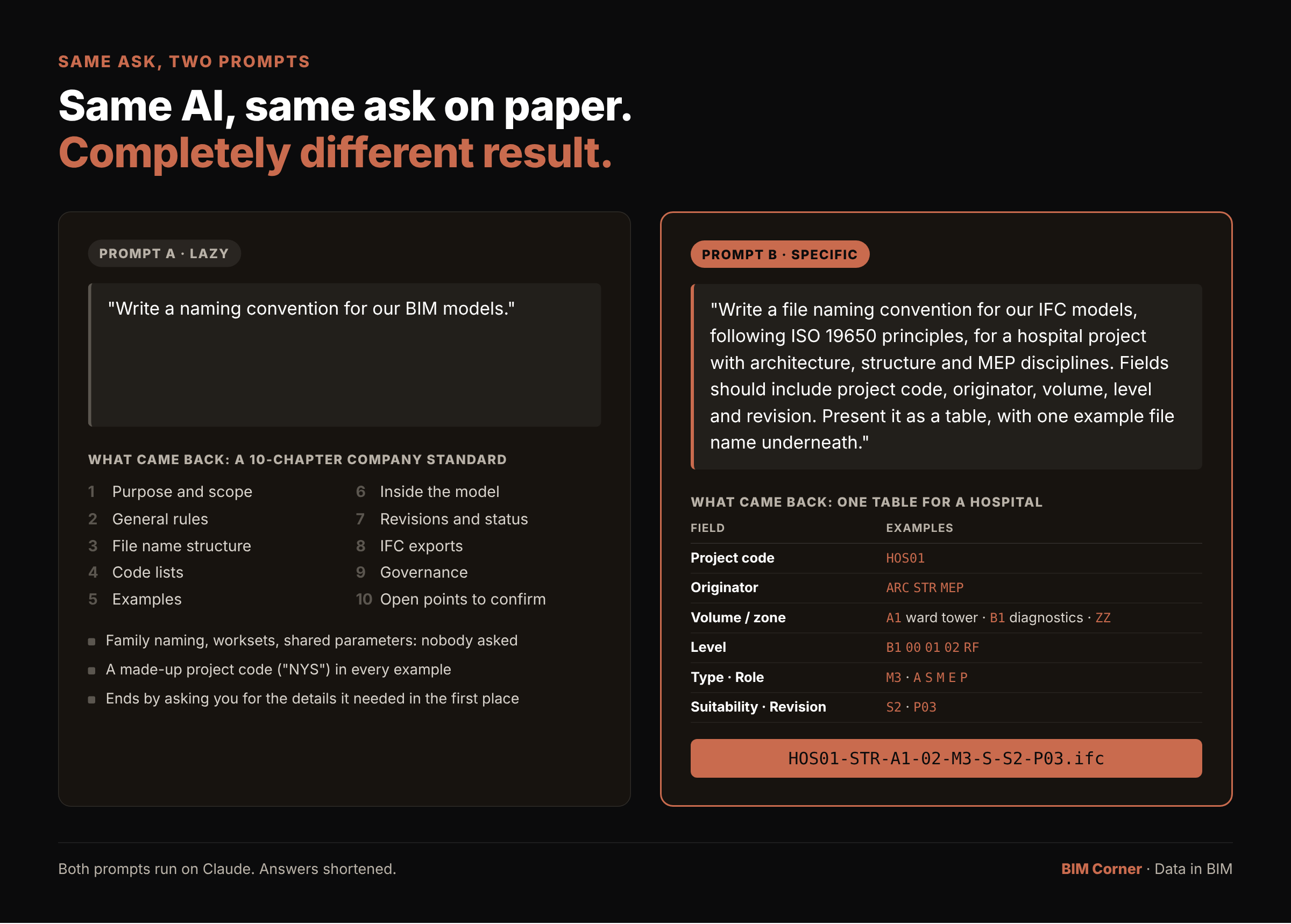
Same ask, two prompts, two very different answers.
In my last article I wrote that you should let AI say "I don't know". This one shows where that sentence actually goes. I'll build one structured prompt, block by block, on a real LOIN requirement, so you can copy the structure for your own work.
What is prompt engineering?
A fancy name for a simple thing: explaining what you want, so the model doesn't have to guess.
The problem? Nobody fully agrees on how to do it, not even the companies that build the models. Two examples. One page of Anthropic's prompting guide says XML tags help Claude read complex prompts without confusion. Another page of the same guide says XML tags and heavy role prompting are "less necessary with modern models". The same guide also tells you to say what to do instead of what not to do, and uses "NEVER use bullet points" as its example of the less effective way. Meanwhile, popular AI blogs say prohibitions do more work than requests, because prompting "no jargon" or "don't invent statistics" each remove a whole category of bad answers.
The subject changes so often, that it is better to learn a structure and not tricks and ready answers.
Does every prompt need a structure?
No. If you're chatting ("What does LOIN stand for?"), a short prompt is fine. You read the answer and ask a follow-up. A sloppy first answer costs you nothing.
But quite often you need something usable straight away: a table for the BEP, a checklist for the architect. You want to get it right in one go. In AI terms that's a single-turn prompt: one message, one answer, no back-and-forth.
And that's where short prompts fail. Every gap in the prompt becomes a guess, and the model guesses confidently (more on that in Can you trust AI with IFC properties?).
In other words: the less back-and-forth you plan, the more structure you need. And keep one focused task per prompt. Five parts, five prompts. That's also how my three-step method works.
Meet the partition wall
Time for a real example. We'll take one requirement and give it to Claude twice: first with a lazy one-line prompt, then with a structured one. Then we compare the two answers.
Our requirement is one cell from an example LOIN matrix: non-load-bearing masonry partition walls at LOIN 200, schematic design (New to LOIN? Start with Explaining information requirements in ISO 19650).
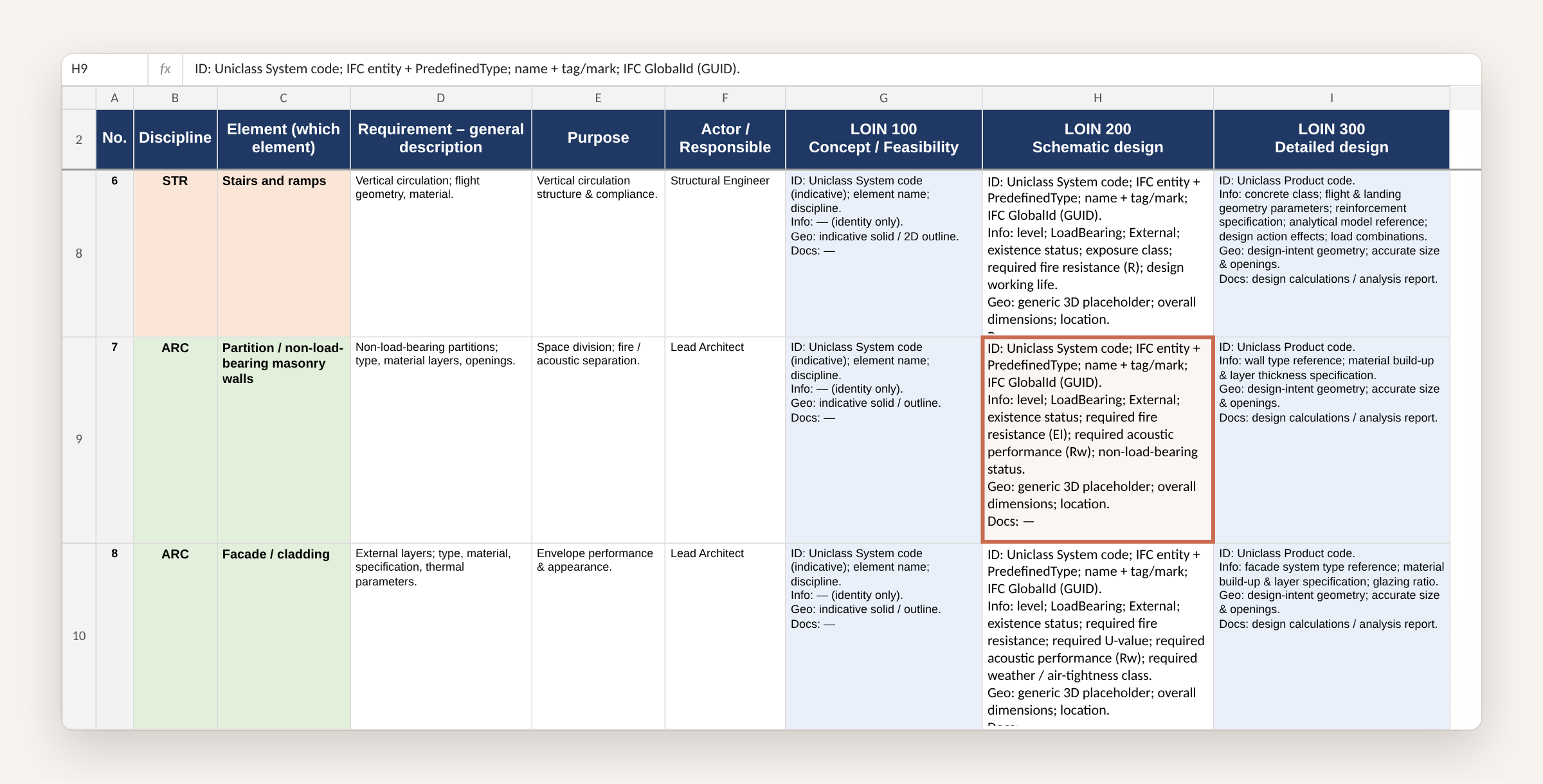
One cell, four groups, fifteen requirements, and a few traps.
The task: a checklist the architect can use before the model goes to the CDE. First, the lazy way:
"Make a checklist for the architect from this: [the cell]"
Not bad at first sight. Fifteen tick boxes in four neat groups, and a note at the end that LoadBearing and "non-load-bearing status" overlap.
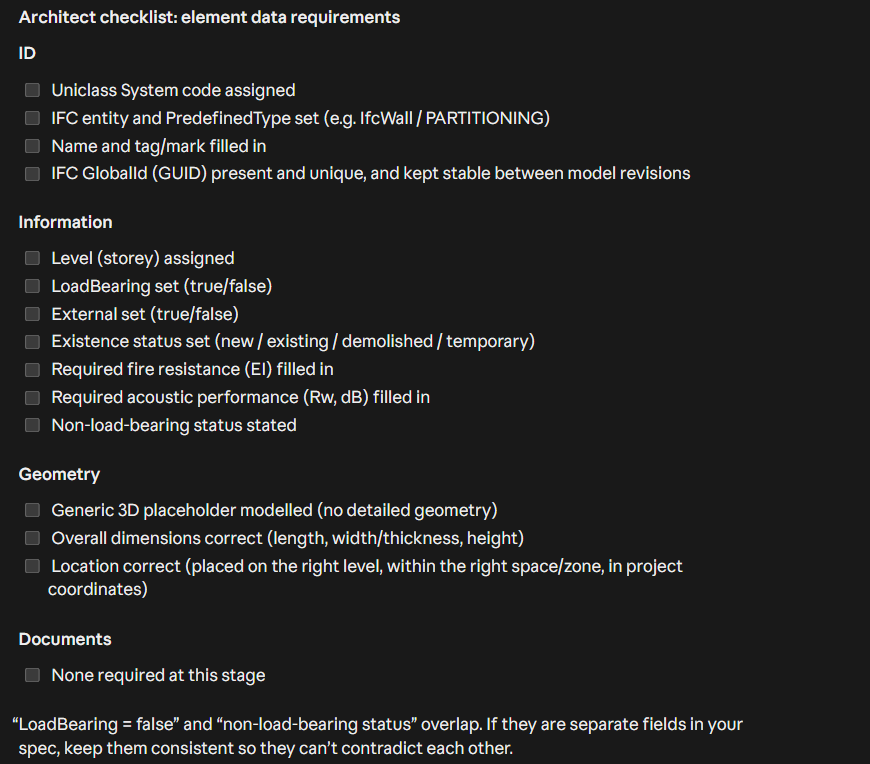
Fifteen tick boxes, zero open questions.
But read the brackets. The cell never says IfcWall / PARTITIONING. It doesn't list existence status values, yet the checklist gives four: new, existing, demolished, temporary. GUIDs "kept stable between model revisions" and walls placed "within the right space/zone" aren't in the LOIN either. Claude filled that in from its general knowledge.
And look at what it ticks as done. "Required fire resistance (EI) filled in". Filled in with what? EI30, EI60? The cell doesn't say, and the checklist doesn't ask. The same goes for Rw. The architect ticks the box, and the gap in the requirement travels on to the model.
Most of it isn't wrong. But it isn't what the LOIN says, and there isn't a single open question in the list.
Send that to the architect and you've just changed the client's requirements without telling anyone.
The lazy checklist wasn't stupid. It was guessing: why you need it, what it may add, what a good answer looks like and what shape to give it. A structured prompt takes those guesses away.
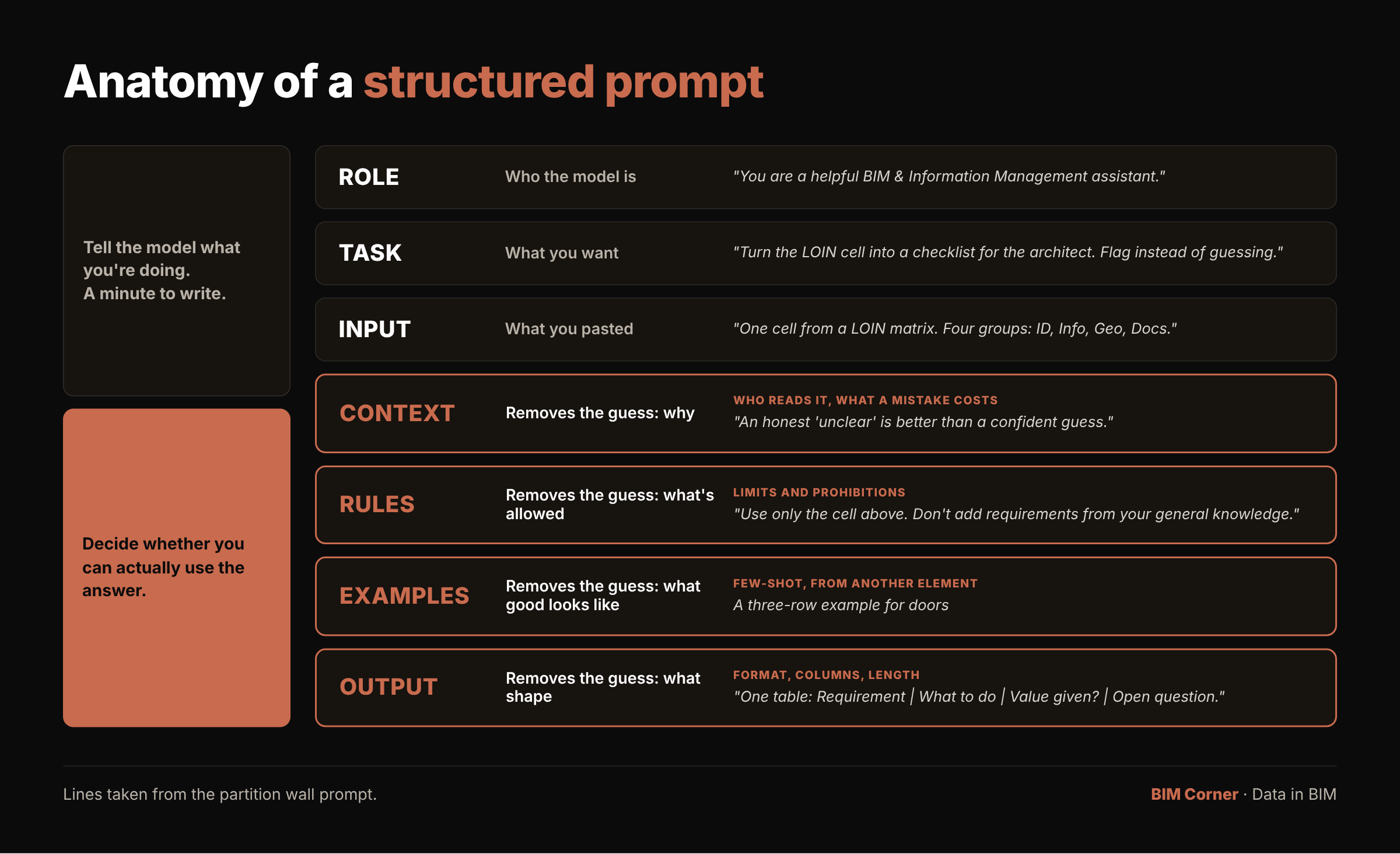
It has seven parts. Role, Task and Input take a minute to write and tell the model what you're doing. Context, Rules, Examples and Output take longer, and they decide whether you can actually use the answer. Each of those four removes one of the guesses above.
Role
Who the model is. Keep it plain: "You are a helpful BIM & Information Management assistant."
Not "a world-renowned BIM expert who never makes mistakes". An over-specific role boxes the model in.
Task
What you want, in one or two sentences. Give the model permission to flag instead of guessing right here: "Turn the LOIN requirement cell below into a checklist for the architect. If a requirement is unclear, duplicated or has no value, flag it instead of guessing."
Input
What you're pasting and how it's built. The model can't see your Excel file the way you do, so tell it: one cell from a LOIN matrix, partition walls, LOIN 200, four groups, requirements separated by semicolons.
Context
The why, not only the what. Rules cover the cases you thought of. The why covers the ones you didn't.
Tell the model who reads the output, how it will be used, what success looks like and what a mistake costs. In the wall prompt: "The architect doesn't read the LOIN matrix... A wrong or invented line costs a rejected delivery, so an honest 'unclear' is better than a confident guess."
That's the "allow I don't know" from my last article, with a reason attached. This part removes the guess about why you need the answer.
Rules
Be specific, and say what's off-limits: constraints, the standard you follow, what's non-negotiable. This part removes the guess about what the model may add. It's also where the advice from my last article becomes actual prompt lines:
Advice from the last article
Line in the prompt
Allow "I don't know"
"If a requirement needs a value the cell doesn't give, write it in the Open question column."
Quote the source
"Copy the requirement exactly as written in the cell."
Not from memory
"Use only the cell above. Don't add requirements from your general knowledge."
Check against the schema
Not a prompt line. That's a check after the answer comes back.
Yes, those are prohibitions. My rule of thumb: for formatting, say what you want. For facts, say what's forbidden. "Use only the cell above" is the line that stops the lazy version's IfcWall / PARTITIONING guess.
Examples
One good example beats a thousand words of rules. It removes the guess about what a good answer looks like. This is called few-shot prompting.
Start with one example. Add a second only if the output still drifts, and make it different from the first. Check it twice, because models copy your examples faithfully, mistakes included. And take it from another element, or the model just copies the answer. In the wall prompt, the example is a door.
Output
Say the shape, exactly. If you don't ask for five bullets, don't be surprised by four paragraphs.
Name the format and the columns. Give a length. Say what to do, not what to avoid: "write it as an email to the architect" works better than "no bullet points". And your style leaks into the answer. Write your prompt in tables and you get tables back.
The whole prompt, and what came back
Here are all seven blocks together. Copy it, swap the cell, the element and the context for your own, and run it.
ROLEYou are a helpful BIM & Information Management assistant.
TASK
Turn the LOIN requirement cell below into a checklist for the architect. If a requirement is unclear, duplicated or has no value, flag it instead of guessing.
CONTEXT
The architect doesn't read the LOIN matrix. They'll use this checklist before uploading the model to the CDE at the end of schematic design (LOIN 200). A good checklist lets them tick each line in the model without asking me. A wrong or invented line costs a rejected delivery, so an honest "unclear" is better than a confident guess. The architect knows standard modelling practice, so only ask questions that would block the delivery.
INPUT
One cell from a LOIN matrix. Element: Partition / non-load-bearing masonry walls. Stage: LOIN 200. The cell has four groups: ID, Info, Geo, Docs. Requirements inside a group are separated by semicolons.
CELL:
ID: Uniclass System code; IFC entity + PredefinedType; name + tag/mark; IFC GlobalId (GUID).
Info: level; LoadBearing; External; existence status; required fire resistance (EI); required acoustic performance (Rw); non-load-bearing status.
Geo: generic 3D placeholder; overall dimensions; location.
Docs: —
RULES
- Use only the cell above. Don't add requirements from your general knowledge of LOIN, ISO 19650 or IFC.
- One requirement per row. Copy the requirement exactly as written in the cell.
- If a requirement needs a value or target that the cell doesn't give, or two requirements seem to say the same thing, write it in the "Open question" column.
- "—" means no requirement. Write one row saying so.
EXAMPLE (a different element, same format)
Cell: Doors and gates, LOIN 200 – "Info: required fire resistance; required clearance width & height; handing requirement."
| Requirement | What to do in the model | Value given? | Open question |
| required fire resistance | Fill in the fire resistance on every door type | No | Which class per door: EI30, EI60? |
| required clearance width & height | Model doors at their clear opening size | No | Minimum width and height? |
| handing requirement | Set left/right handing on every door | Not needed | — |
OUTPUT
One table with exactly these columns: Requirement | What to do in the model | Value given? | Open question.
Group the rows under ID, Info, Geo, Docs. Nothing before or after the table.
And the result? One table, fifteen rows, grouped as asked, nothing before or after it.
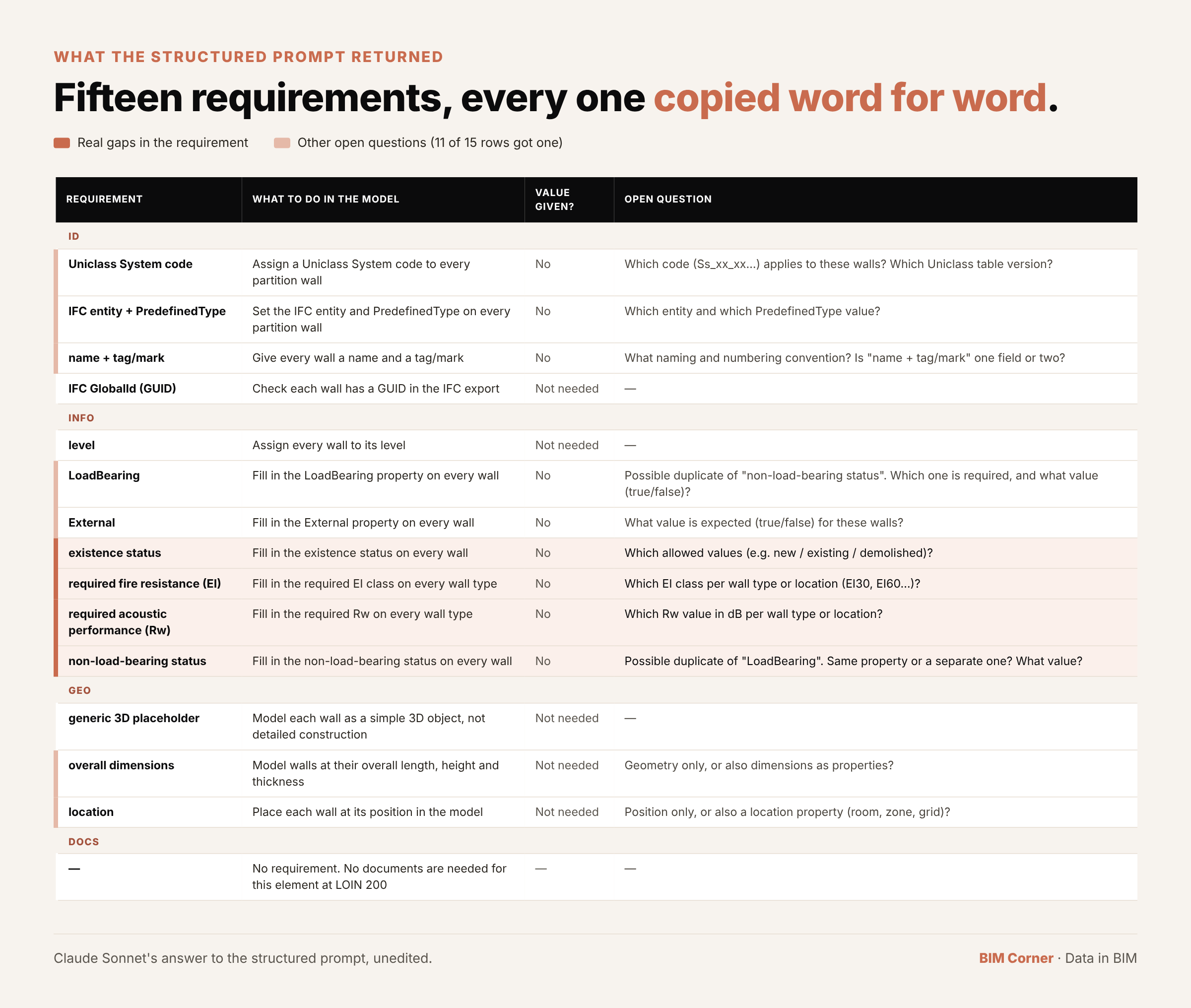
Fifteen requirements, every one copied word for word from the cell.
It asked instead of assuming. Where the lazy version listed four status values and ticked "EI filled in", this one asks which values and which class. It flagged EI and Rw without values, the undefined existence status and the possible LoadBearing duplicate. It didn't guess the IFC entity either, it asked: "Which entity and which PredefinedType value?"
It isn't perfect. If I had to reuse it on hundreds of requirements I would tweak it further.
And yes, a prompt this long for one LOIN cell might look puffed up. It is only an example. On a real project you don't have one requirement, you have 200 or more. That's where a structured prompt stops being a nice-to-have: every gap in it gets repeated on every row.
In the first edition of The AI Data Validation System I taught exactly this: how to prompt, block by block, on real large requirement files. As one of the participants put it:
"It is rich in information and practical knowledge that can be applied well beyond the specific field it covers - the prompt engineering strategies are general and can be used in any context."
- Michele Braga, BIM Coordinator, SA+ Engineering
If you're interested in the next edition, join the waitlist at datainbim.com.
Summary
A short prompt is fine for a chat. For a usable answer in one go, use structure. ROLE, TASK and INPUT take a minute. CONTEXT, RULES, EXAMPLES and OUTPUT decide whether you can use the answer or have to rewrite it.
Block
The guess it removes
Typical mistake
ROLE
Who is talking
A "world-renowned expert" that boxes the model in
TASK
What you want
No permission to flag instead of guessing
INPUT
What you pasted
Pasting data without saying how it's built
CONTEXT
Why you need it
Pure instructions, no purpose
RULES
What's allowed
No limits on facts, or a laundry list of edge cases
EXAMPLES
What good looks like
An example with a mistake in it, or from the same element
OUTPUT
What shape it takes
Not naming the format at all
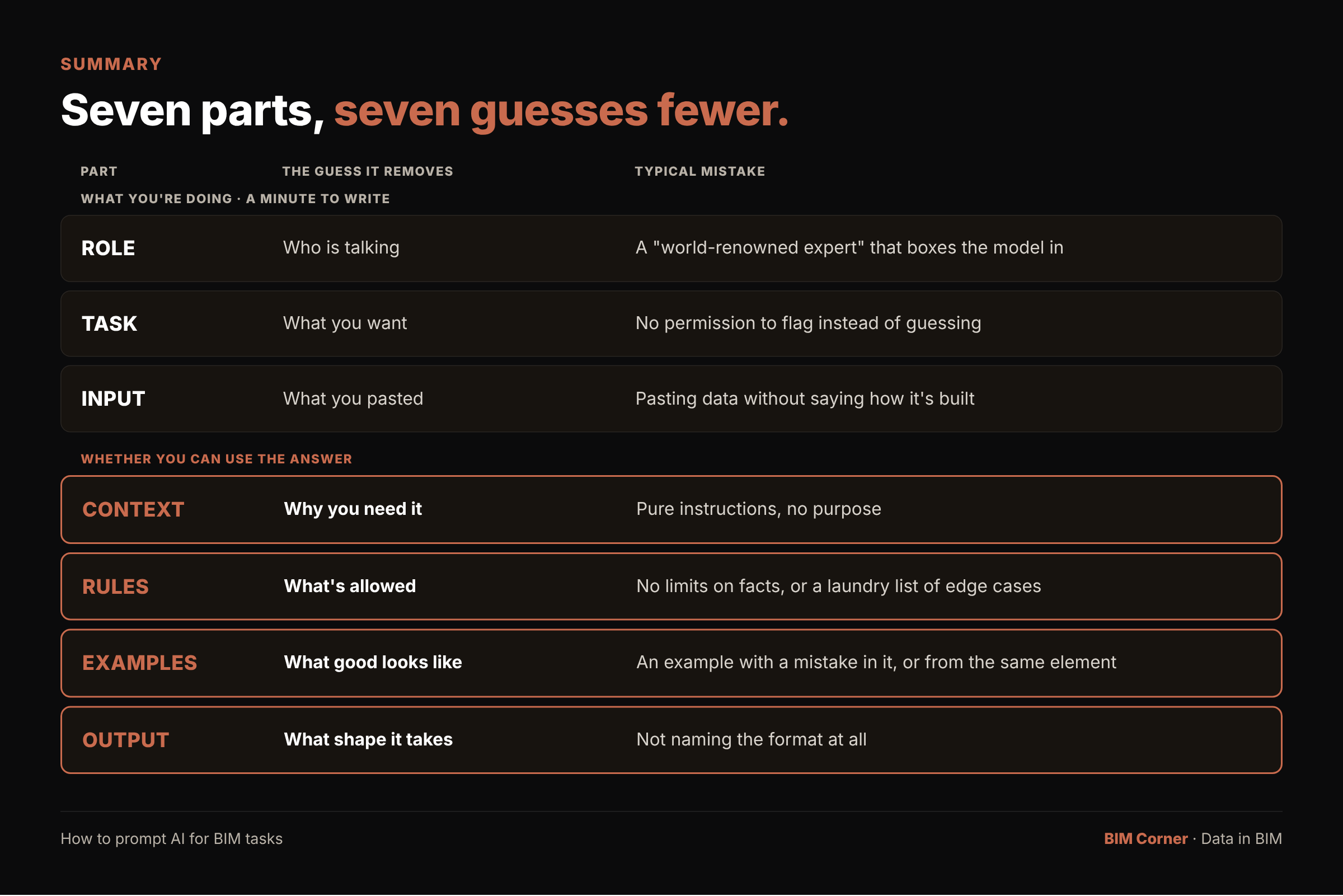
Seven blocks, seven guesses fewer.
Want to try AI on your own requirements, with the guardrails in place? Get the free LOIN to IDS Translator.
And tell me in the comments: what's the worst answer a lazy prompt has ever got you?
Resources
- Anthropic, Prompting best practices
- Anthropic, Best practices for prompt engineering