
We have become digital janitors
You were hired as an engineer. Somebody pays you an engineer's rate. Now think honestly about last week: how many of those hours went into work a machine should have done?
I mean the mechanical part. Clicking through a model to check it. Copying errors into a report nobody fixes. Uploading and downloading models on the CDE. Fixing tags and typos, then doing it again two weeks later.
The BIM coordinator's job has been designed to clean up somebody else's mess. Most of the time manually.
Why does nobody check the data?
Ask what model checking means on a typical project and you get one answer: clash detection.
But BIM coordination is not only clash detection. Next to it sits data validation: making sure the required properties exist and hold correct values. Most projects neglect it.
Why? Because clash detection is easy. Not easy to fix. Easy to find. Two things cross in the same place and they should not. Nobody has to define what a clash is.
Data is invisible.
Look at two doors in your model. One has a fire rating inside it, one does not. Both look perfectly fine on screen, and plenty of software still cannot tell you the difference.
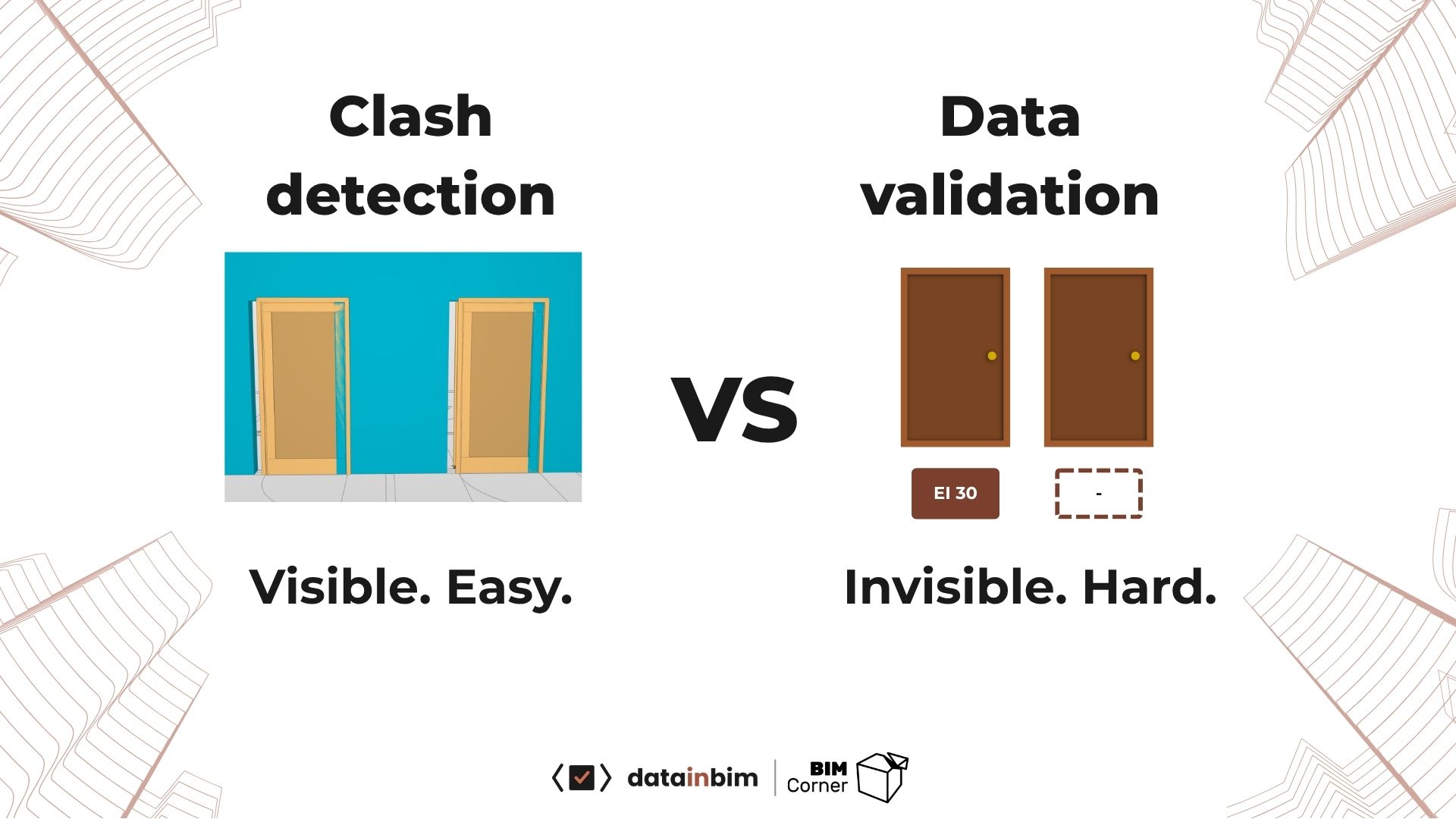
A clash is visible, so everybody checks it. A missing property looks like nothing at all.
Data has no natural definition of wrong. Somebody has to write down what right looks like, and that written-down thing is the EIR, which nobody has read.
So the industry checks what it can grasp and calls it quality control.
What bad data actually costs
If the data is blank, or wrong, the owner cannot load it into the maintenance system at handover. So they pay somebody to walk the finished building and write down every code and nameplate by hand. They pay twice for the same information.
Contractors lose money on bad data too. Imagine the doors from the picture above. The contractor counted the doors with a fire rating and ordered them. But some of the doors that should have carried that property did not, so they arrived as the wrong type. Who picks up the bill?
Three reasons this keeps happening
The requirements are unreadable
On Nye SUS, the new Stavanger University Hospital, the full set of BIM requirements was six documents. 146 pages. Over two hundred properties demanded across all disciplines.
You know what happens to a document like that. Be honest about your current project: who has read past page ten?
BIM data validation is done by hand
This is the clicker's trap, and I sat in it for years. Download the models, update them, wait, adjust the rulesets, run the engine, wait again, sort the real issues from the noise, group them per designer, export BCF, create the tasks. Then multiply that by a few thousand issues.
Finding the one issue that matters among three thousand is a needle in a haystack problem, so plenty of people give up and check the model visually instead.
On the hospital, manual data validation took me 20 hours every second week. Half a working week, and most of it was mindless clicking.
The work does not compound
That is what burns people out. The issues never end, and nothing you did last month makes this month faster.
Ask any BIM coordinator what they want to be better at a year from now and you get two answers: better processes, and less repetitive work.
Nobody says "get faster at clicking".
So what changed?
For years I built these checks by hand, rule by rule. It worked, but it was so slow and so fragile that nobody else in the project would touch it.
Two things changed that, and many BIM coordinators and managers use neither of them properly.
A standard machines can read
In June 2024 buildingSMART released the Information Delivery Specification, IDS. It describes requirements in a form software can execute, and most IFC model checkers can read it. You can read more about it here.
One problem remains: producing the file. IDS is XML, and writing it by hand is miserable. Clicking it together in an editor is worse: seven clicks and fifteen seconds per requirement, and a project has at least a hundred.
Language models that read a mess and give back structure
The second novelty arrived with ChatGPT in early 2023. AI is very good at two boring things: understanding prose and structuring data. Which is exactly what the requirements problem is.
Why can you not just ask ChatGPT for the file?
Because I tried, and you probably did too, and it is not as straightforward as it looks at first. Broken syntax and hallucinations, handed over with total confidence.
The problem is that AI is a black box. You put in a document and a prompt, the model thinks something, and out comes an answer. Sometimes correct, other times nonsense.
In our branch we cannot settle for "pretty good", because "small" errors can cost millions (or even years in prison if something collapses...). We need to be as close to fully correct as possible with whatever AI generates for us.
The answer is that AI needs guidance. The right documents and context files on the way in, a defined structure for the answer, and a human checking every deliverable on the way out.
The Three-Step Method: Draft, Verify, Validate
So I built a workflow around what AI is good at and what IDS makes possible. Here is how it works, step by step.
AI drafts the requirements. You verify them. The software validates the model against them. Draft and verify run in a loop, as many times as it takes, until the table says exactly what the client asked for. Nothing more, nothing invented.
Everybody already tries the first step. Almost nobody does the second.
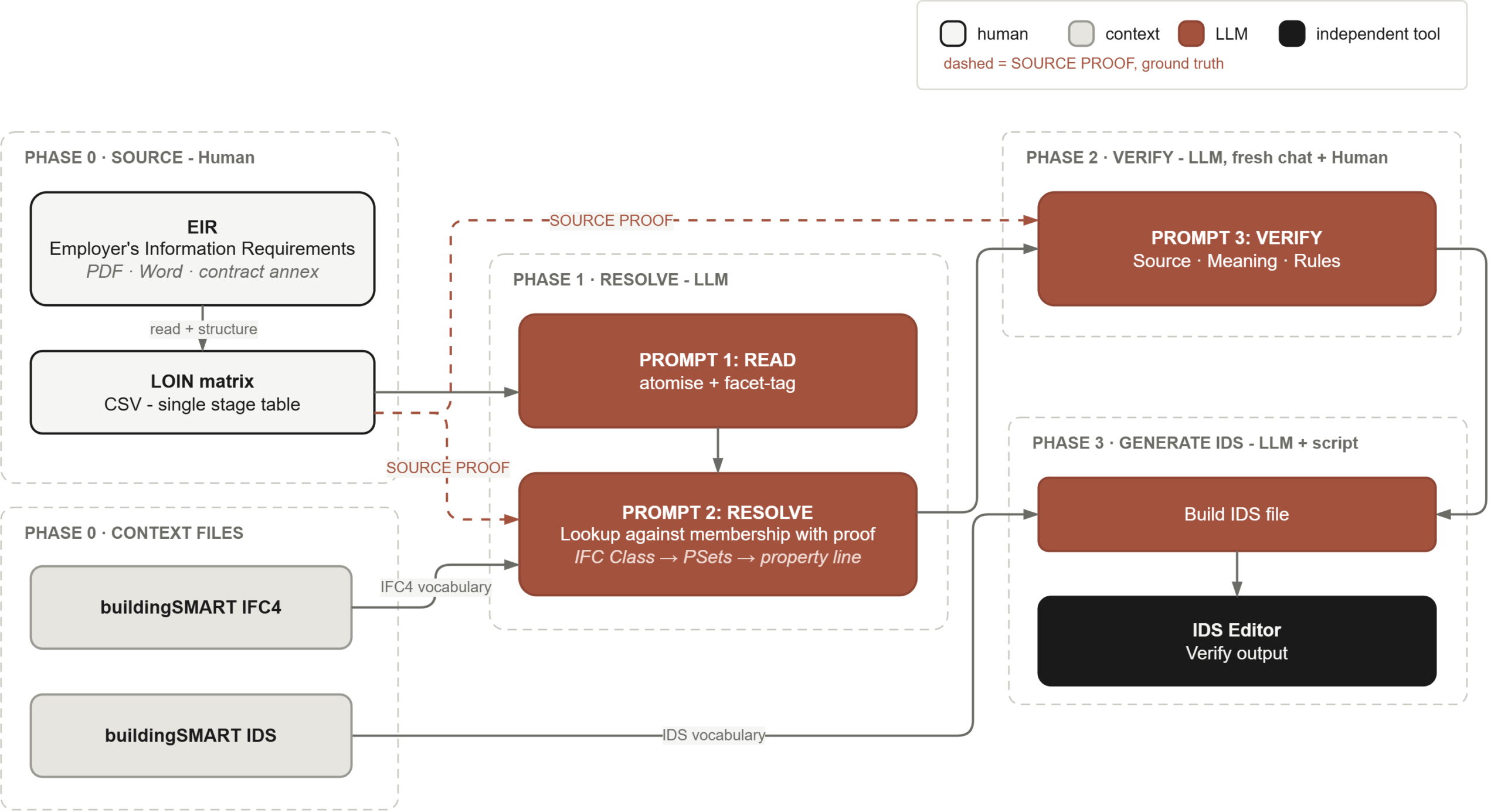
The whole workflow on one picture. White is human, grey is a context file, red is the language model, black is an independent tool.
Draft
Two things go into this step.
The first is the client's document, exactly as it arrived. My example was an Excel file with every stage mixed together and five or six requirements crammed into one cell. Take a single stage at a time, because the data evolves as the project moves on. I picked LOIN 200 and left the rest alone.
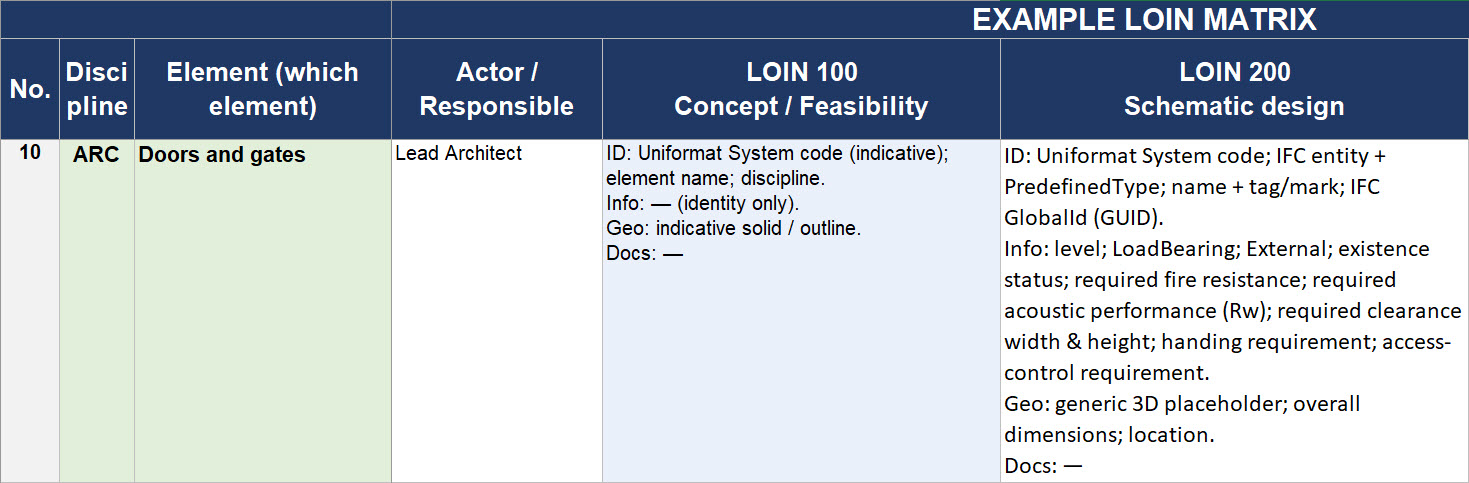
One row, one cell, and a whole list of requirements inside it. This is how the client's document usually arrives.
The second is the context files, and this is the part people skip. The IFC4 schema and the IDS documentation, converted into plain markdown a language model can read. Without them the model works from training memory, and that memory only covers the famous properties like FireRating or LoadBearing. Ask for anything past that and it fills the gaps with its own imaginary properties.
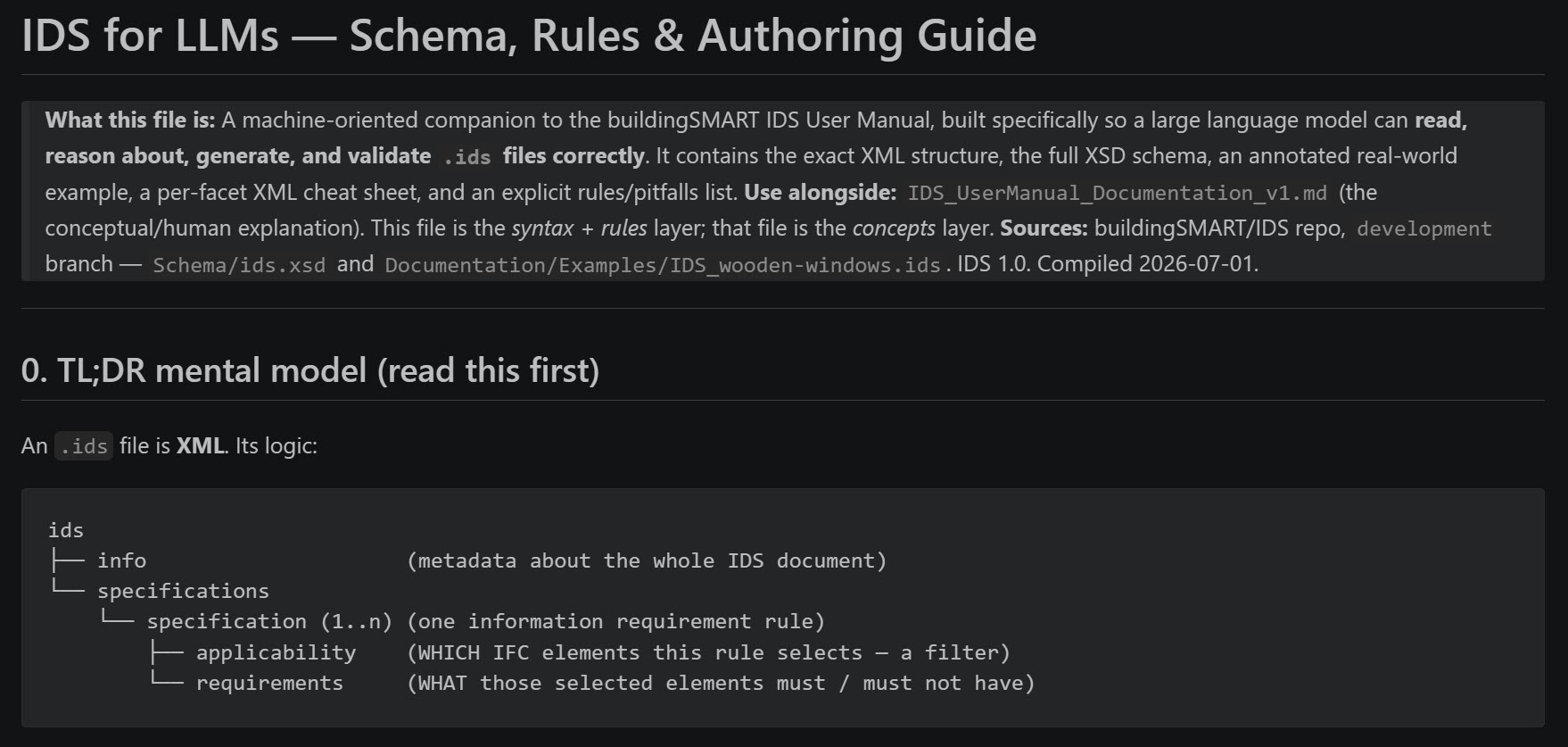
The IDS documentation rewritten for a machine reader. Boring to prepare, and the single biggest reason the output stops being fiction.
Then two prompts. The first splits the document: one requirement per row, nothing merged. My single door requirement cell turned into seventeen separate requirements.
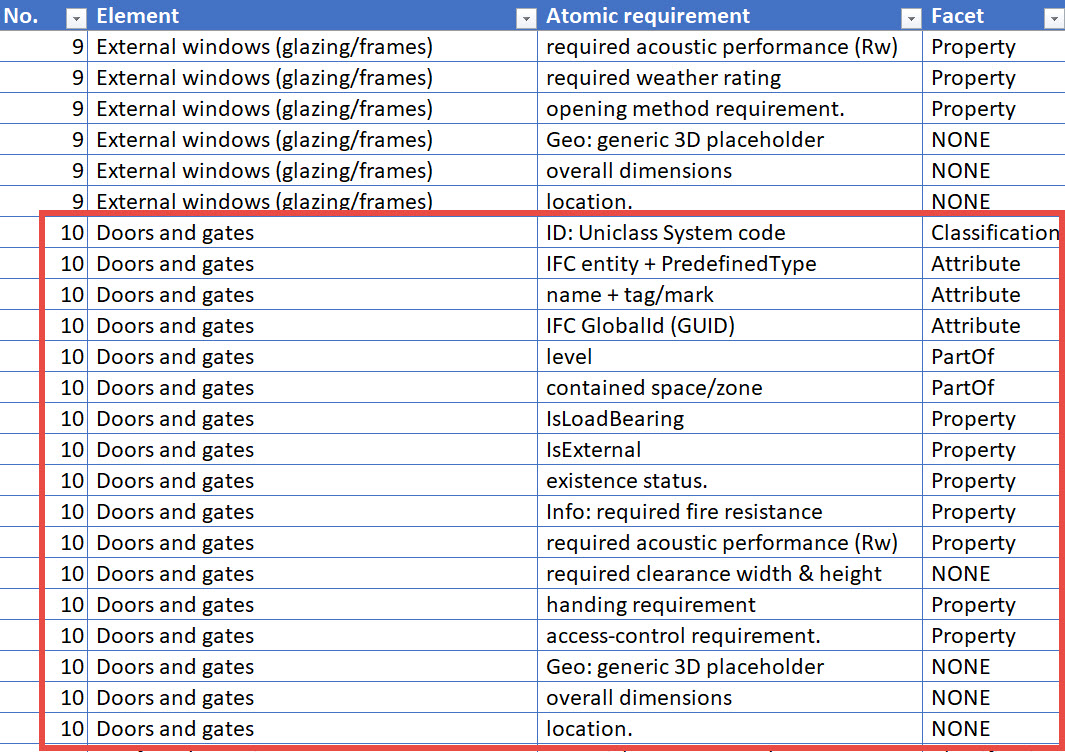
The same doors after atomising. Seventeen rows, each one checkable on its own.
The second resolves each row against the IFC4 vocabulary and returns an IFC class, a property set, a property and a data type, plus a quotation from the source.
Verify
Verification does not happen in the model. It happens in the file, before the model is involved at all.
Here is why. A wrong property can pass every automated check you own. It exists in the IFC schema, it sits on a legal property set, the file parses, the checker turns green. Structurally there is nothing to find. The only thing that knows the requirement is wrong is the sentence your client wrote, and no software has read that sentence.
So the sentence has to travel with the data. Every row carries a quotation from the client's document, with the page it came from. Not a summary, the client's own words. You can skim a summary and nod along. You cannot skim a quotation sitting next to a property name that does not match it, and when AI cannot produce one at all, you have just caught an invented requirement.
Then three passes.
The first is a script (or even an Excel lookup, if you do not code at all), and it is deliberately stupid: it checks the IFC classes, the property sets and the properties against the schema, and has no opinions about anything else. Human-made rules, written once, run forever.
The second pass is AI again, and I know how that sounds. AI checking AI is how you stack errors on top of errors. But this one gets the client's sentence on one side, the chosen property on the other, and one job: to argue that the two do not mean the same thing. It changes nothing, it only gives you its reasoning.
What reaches you is short: the rows the passes flagged, not 146 pages. And that is the third pass, the human one. You have to scan what you received, either thoroughly or as a spot check. This is manual and it takes time, I know. Verification will never be one click. But this is the cheapest place to get your hands dirty.
Validate
What comes out of the first two steps is an IDS file. Angle brackets, namespaces, nested schemas. Ugly code, if you ask me.
You check that the file opens before you go near a model. Then it goes into the IFC checker. If your tool does not read IDS at all, that is worth finding out this week, and not on the day a client sends you one.
Upload, run the check, create the issues, export the BCF. The usual coordination procedure.
Now the part that gives the hours back. None of those clicks have to be mine. Solibri automates through Autorun: an XML that tells the software what to do, and a small batch file that starts it. The XML follows the same schema family as IDS, so AI writes that one too, with the Solibri Developer Platform documentation as a context file.
Then it runs at night and the report is on my desk in the morning. That is how twenty hours every second week turned into about two. The tooling is Solibri-specific, but the shape of it is not.
If you want to watch me run this end to end, with explanations, ready prompts and context files, on a real document, that is what I teach in the course. Check at the bottom 👇
Summary
AI does not fix your client, and the issues will not stop coming just because we have language models now. What changes is your position in the work.
IDS and LLMs change what is possible here, but neither of them removes you. The draft is confidently wrong in places, so verification stays yours. If your name goes on the report, you read the quotations yourself before the file ever touches a model.
Do that once and the work compounds. The rules you wrote this month still run next month, and on Monday you read a report instead of producing one.
Some Friday afternoon soon, another revision lands on the CDE. Either you open it by hand and hope, or the check has already run and the report is waiting for you.
You stop being the person who checks models, and become the person who set up the checking.
The AI Data Validation System
A live course on the workflow above: taking your client's requirements document, turning it into an IDS file you can defend, and setting up a check that runs against your model on its own. You keep the prompt book, the templates, context and reference files, the verification process map and the ready-made Solibri Autorun files.
Built on three months of full-time work on the process, on top of five years of data validation on a 125 000 square metre hospital, delivered without drawings.