
Rhino and Grasshopper were not originally built for buildings, BIM, or structural analysis. Rhino began as a tool for accurate, complex geometry, but its ability to work with many different applications has made it increasingly important in AEC industry.
Instead of replacing Revit, Tekla, Archicad, or analysis software, Rhino and Grasshopper connect them. They help architects and engineers automate repetitive work, generate geometry, and build workflows that would be difficult inside one closed platform. The future of AEC may belong not to the software that does everything, but to the software that connects everything.
Table of Contents
1. The AEC tool winning right now was not built for AEC
Rhino did not begin as an architecture, BIM, or structural engineering platform. Its story started around AutoCAD, where Robert McNeel & Associates worked on adding advanced NURBS geometry to existing CAD workflows. In 1992, the company began developing a prototype with Applied Geometry, followed by a NURBS modeling solution for AutoCAD. McNeel later decided that the technology would be more powerful as an independent Windows application, and Rhino 1.0 was released in 1998.
Its first major advantage was the ability to create accurate free-form geometry. NURBS made it possible to represent everything from simple curves to highly complex surfaces and solids. More importantly, the geometry could be transferred to other engineering, manufacturing, and design software.
Marine design became one of Rhino’s first natural applications. Ship hulls require smooth, continuously changing surfaces that must be accurate enough for analysis, fabrication, and production. Rhino could create this geometry without trying to replace the specialist marine software used later in the workflow.
This established a pattern that still defines Rhino today. It does not need to perform every task. It needs to create reliable geometry and connect effectively with the tools that perform analysis, documentation, fabrication, or manufacturing.
The same advantage soon attracted other industries. Product designers, automotive specialists, furniture designers, and jewelry manufacturers used Rhino for forms that were difficult to create in traditional CAD systems. Jewelry design, in particular, benefited from the combination of small-scale precision, complex curves, manufacturing-ready models, and an accessible software ecosystem.
Architects later recognized that they faced many of the same challenges. Free-form roofs, curved structures, irregular façades, repeated panels, and custom building components were difficult to model in conventional CAD and early BIM software. Rhino offered more freedom and fewer geometric restrictions.
However, Rhino alone was only part of the transformation.
Grasshopper turned it from a flexible modeling tool into a computational design platform. Instead of creating geometry manually, users could define the logic, relationships, and parameters that generated it. This made Rhino relevant not only for complex shapes, but also for automation, optimization, data management, BIM workflows, and structural engineering.
Rhino entered AEC because of geometry. Rhino and Grasshopper continue to grow because they provide the flexible logic and interoperability layer that specialist software often lacks.
2. Visual programming lowered the barrier to automation
Grasshopper gave architects and engineers a visual interface for programming.
Instead of beginning with syntax, classes, functions, and software development environments, users could connect components on a canvas. Data moved from left to right through visible wires, making the logic easier to inspect.
McNeel still describes Grasshopper as a visual programming environment that does not require previous programming or scripting knowledge. This low entry barrier was critical to its growth.
AEC professionals did not need to become software developers before automating their first task. They could begin with points, curves, lists, numbers, and simple transformations.

The visual interface is only the beginning.
As workflows become more advanced, users can move into reusable clusters, custom components, plugins, APIs, cloud applications, Python, and C#.
Rhino 8 includes a modern scripting environment with CPython 3 and C# support inside Rhino and Grasshopper. This creates a natural progression from visual scripting to text-based programming.
You can begin without coding, but you are not trapped at the beginner level.
3. More than 50 file formats make Rhino an interoperability machine
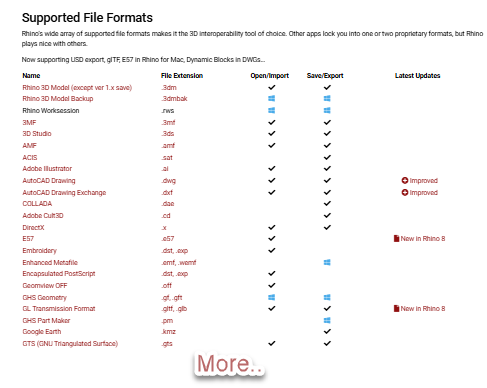
Rhino’s supported file formats include widely used standards such as DWG, DXF, STEP, IGES, STL, OBJ, PDF, SketchUp, E57, glTF, FBX, SolidWorks files, point-cloud formats, and many more.
The current official format list contains more than 50 file-format entries. You can review the live list on McNeel’s supported file formats page.
This makes Rhino useful even when it is not the primary authoring application. It can receive information from one system, process or rebuild the geometry, and deliver the results to another.
In an industry filled with incompatible applications and proprietary formats, this flexibility is extremely valuable.
4. More than 30 AEC connections are changing daily workflows
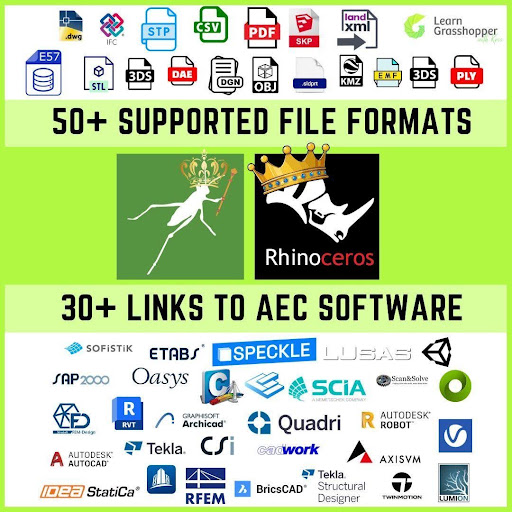
The Rhino and Grasshopper ecosystem now includes more than 30 important AEC connections, covering BIM, structural analysis, data exchange, and fabrication.
These workflows connect Grasshopper with tools such as Revit, Archicad, Tekla Structures, BricsCAD, IFC, Speckle, SOFiSTiK, RFEM, GSA, ETABS, SAP2000, SAFE, SCIA Engineer, and LIRA-SAPR.
Some connections exchange files, while others use APIs to create and update native objects directly. This means a Tekla beam can retain its profile, material, attributes, and fabrication data, while a Revit element can remain part of schedules, views, and BIM documentation.
Rhino.Inside.Revit brings Grasshopper directly into Revit, while the Tekla Live Link allows users to generate and modify constructible Tekla models. Structural analysis links are also growing quickly, making Grasshopper useful for analytical models, loads, boundary conditions, optimization, and design automation.
For a broader overview, see:
5. Rhino and Grasshopper are not trying to replace everything
Revit is stronger at BIM documentation. Tekla Structures is stronger at detailed structural steel modeling and fabrication. Specialist finite element programs are stronger at analysis and design-code verification.
Rhino and Grasshopper do not need to replace these tools. Their value comes from connecting them, extending them, and automating the work between them.
This is why the Rhino ecosystem can grow without forcing users to abandon their existing software.
A structural engineer can continue using familiar analysis tools while Grasshopper controls model generation and iteration. A BIM team can retain Revit or Tekla as the project database while using Grasshopper for automation. An architect can explore complex geometry in Rhino before transferring native elements into a BIM environment.
Rhino and Grasshopper win by becoming the best addition to other software.
6. Architects and engineers often want different things from Grasshopper
Architects adopted Rhino and Grasshopper earlier through free-form geometry, façade design, environmental analysis, digital fabrication, and generative design. This gave architecture firms more time to build mature workflows, internal tools, and experienced computational design teams.
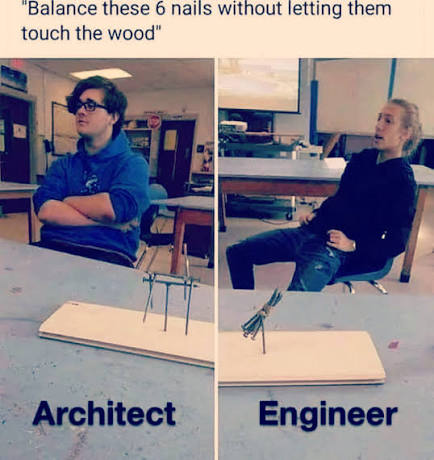
Engineers are catching up fast
From my experience teaching AEC professionals, engineering interest is now growing very quickly. Engineers are using Grasshopper for structural models, BIM and FEM connections, Tekla and Revit automation, reinforcement, Excel workflows, optimization, drawings, and reusable company tools.
Geometry versus process
Architects often start with the form: how to generate a façade, control a building shape, or create design variations.
Engineers more often start with the workflow: how to avoid repetitive modeling, synchronize BIM and analysis models, reduce errors, automate reports, or compare many design options.
This transition can be easier than expected because engineers already work with formulas, dependencies, load combinations, finite element models, and spreadsheets. The main challenge is usually not parametric thinking itself, but understanding how Grasshopper manages lists, data trees, and geometry.
7. Not every AEC professional wants to become a programmer
Not every architect wants to learn Python or C#. Not every engineer wants to become a software developer either.
They do not have to.
Grasshopper can create enormous value without traditional coding. Visual definitions can automate repetitive modeling, process data, generate alternatives, connect applications, and build repeatable workflows.
For many users, this is already enough to transform their daily work.
Other users eventually reach the limits of standard components.
They may need better performance, custom interfaces, external libraries, API access, automated deployment, or protected intellectual property.
At that point, Python and C# become natural next steps.
Grasshopper provides both routes. You can remain a visual programmer, or you can use visual programming as a bridge toward software development.

8. Rhino’s geometry engine is still a major competitive advantage
Rhino can create, edit, analyze, and translate NURBS curves and surfaces, solids, SubD geometry, polygon meshes, and point clouds.
This matters because modern AEC workflows no longer rely on one geometry type.
A point cloud may describe existing conditions. A mesh may come from scanning or optimization. NURBS may define an accurate bridge deck or façade. Solids may represent fabrication geometry. SubD may be used during conceptual development.
Rhino provides a place where these different forms of geometry can be inspected, transformed, rebuilt, and connected.
Complex geometry is no longer the only reason to use Rhino
Rhino is still excellent for difficult geometry, but that is no longer the complete story.
Many of the best Grasshopper automations involve ordinary beams, slabs, reinforcement bars, drawings, attributes, quantities, and spreadsheets.
The geometry may be simple. The workflow is complex.
Grasshopper’s real value is often not the shape it creates. It is the manual process it removes.
9. Open ecosystems beat vendor lock-in
No single software vendor provides the best application for every stage of an AEC project.
Trying to force every discipline into one platform can create inefficient workflows, limited design freedom, and dependence on a single vendor’s roadmap.
Rhino takes a different position. Its supported formats, developer tools, APIs, plugins, and live links encourage users to connect it with other software.
The platform becomes more useful when the surrounding ecosystem becomes larger.
Affordable, permanent licensing supports experimentation
Rhino also continues to offer perpetual licenses, optional upgrades, and no mandatory maintenance fees. McNeel describes the current licensing model on the licensing page.
This lowers the barrier for individuals and teams that want to experiment with computational design.
A company does not need to replace its existing software infrastructure. It can add Rhino and Grasshopper as a flexible automation layer and begin with a focused use case.
That makes adoption easier to justify.
Ready to learn Grasshopper as an engineer?
Most Grasshopper tutorials begin with abstract geometry, unusual towers, or complex façades.
That is not always the best starting point for an engineer.
Engineers need to understand the fundamentals, but they also need to see how those fundamentals connect to BIM, structural analysis, Excel, Tekla, Revit, automation, and real project work.
That is why I created 5 Steps to Learn Grasshopper.
It is a practical guide that shows you how to begin, what to learn first, which mistakes to avoid, and how to move from disconnected tutorials to useful engineering workflows.
Start with the right foundations. Then automate the work you never want to do manually again.
Check out our other articles: