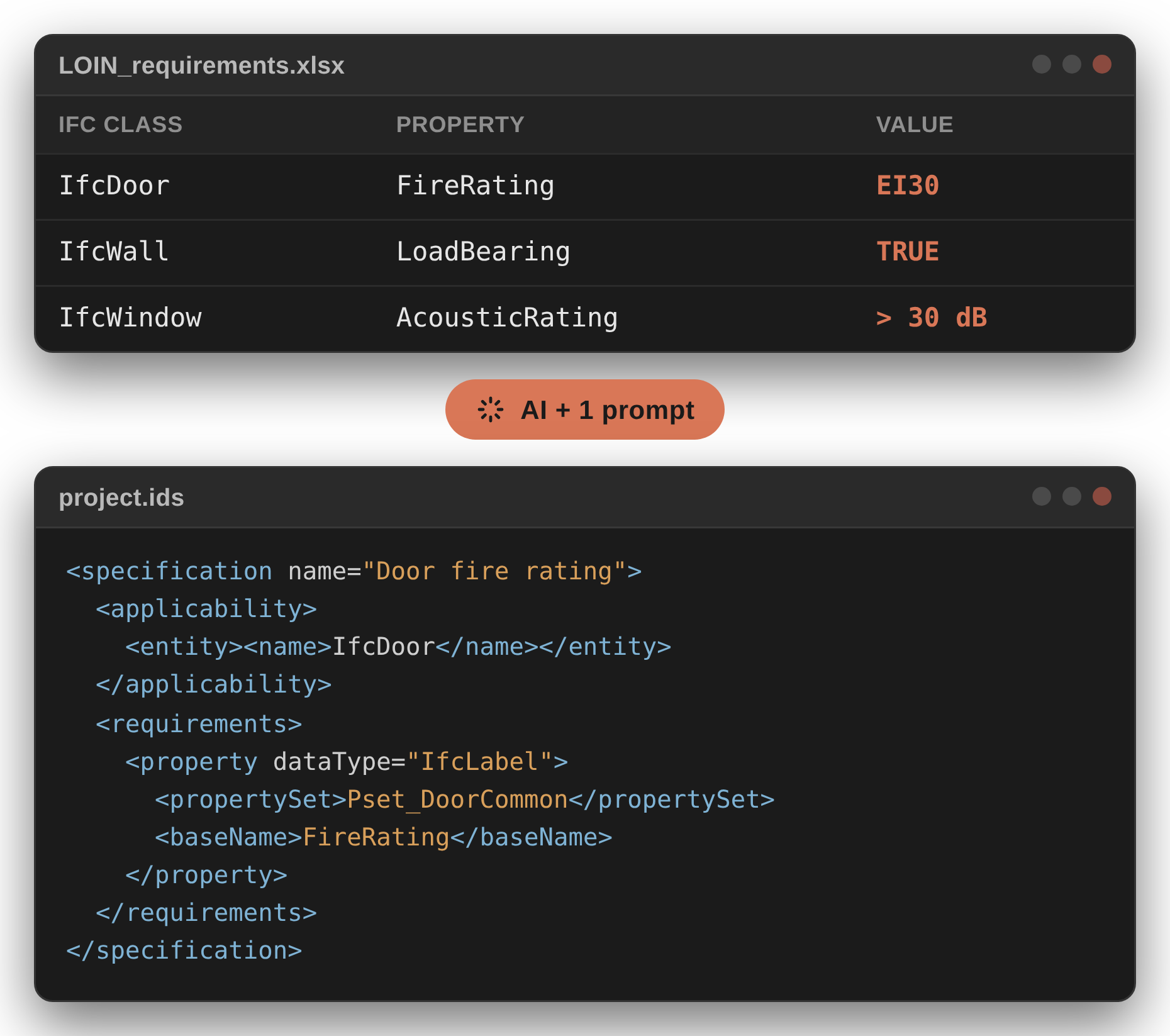

Obviously, you can add your own properties to IFC. Every project I've worked on does it, and Revit, ArchiCAD, Tekla and others all export user-defined property sets (here is how to do it in Revit). There's only one rule. The prefix Pset_ is reserved for property sets defined in the IFC standard. Your own set can be called almost anything, but not Pset_Something. The IFC documentation says it in plain words: every set starting with Pset_ has to be a standard set, with the right properties on the right objects.
And that's exactly the rule AI breaks. It hands you a name starting with Pset_, built exactly like a standard one, that you won't find anywhere in the standard. Not a standard set, and not a legal custom set either. A fake with an official stamp on it.
In other words: custom properties are fine. Fake standard ones aren't.
Why should you care? Because the fake travels. It ends up everywhere you used the answer:
- A designer in one discipline maps it in the IFC export settings, and the model now carries a "standard" set that shouldn't exist. Another designer maps it correctly. Result? Two properties defining the same thing: chaos in the data, multiplied by thousands of properties and millions of objects.
- A BIM coordinator writes it into the BEP or the LOIN table, and designers start hunting for a property set that doesn't exist.
- A designer asks a chatbot which property should hold a requirement, gets a confident
Pset_name back and adds it to the model by hand. - A checking rule, in your coordination software or in an IDS file, looks for it and finds nothing to complain about. Green report. Nothing was checked.
In September I wrote that AI working from its own memory fills the gaps with imaginary properties. This article shows what those gaps look like. Every example below comes from my own test runs while preparing the AI Data Validation System course.
How IFC stores properties, in two minutes
If you've read the Secrets of the IFC format series (part 1, part 2, part 3) and Properties in IFC, feel free to skip this part. For everybody else, the minimum you need:
- Class says what the object is: IfcWall, IfcDoor, IfcPipeSegment.
- Property set groups properties together. Think of chapters in a book or sheets in an Excel spreadsheet.
- Property is one piece of information inside the set: FireRating, LoadBearing, IsExternal.
Standard property sets aren't free to float around. Each one belongs to specific classes. Pset_WallCommon goes on walls, Pset_FootingCommon on footings. Put a window property on a footing and the combination is no longer valid, even if every single name in it is real.
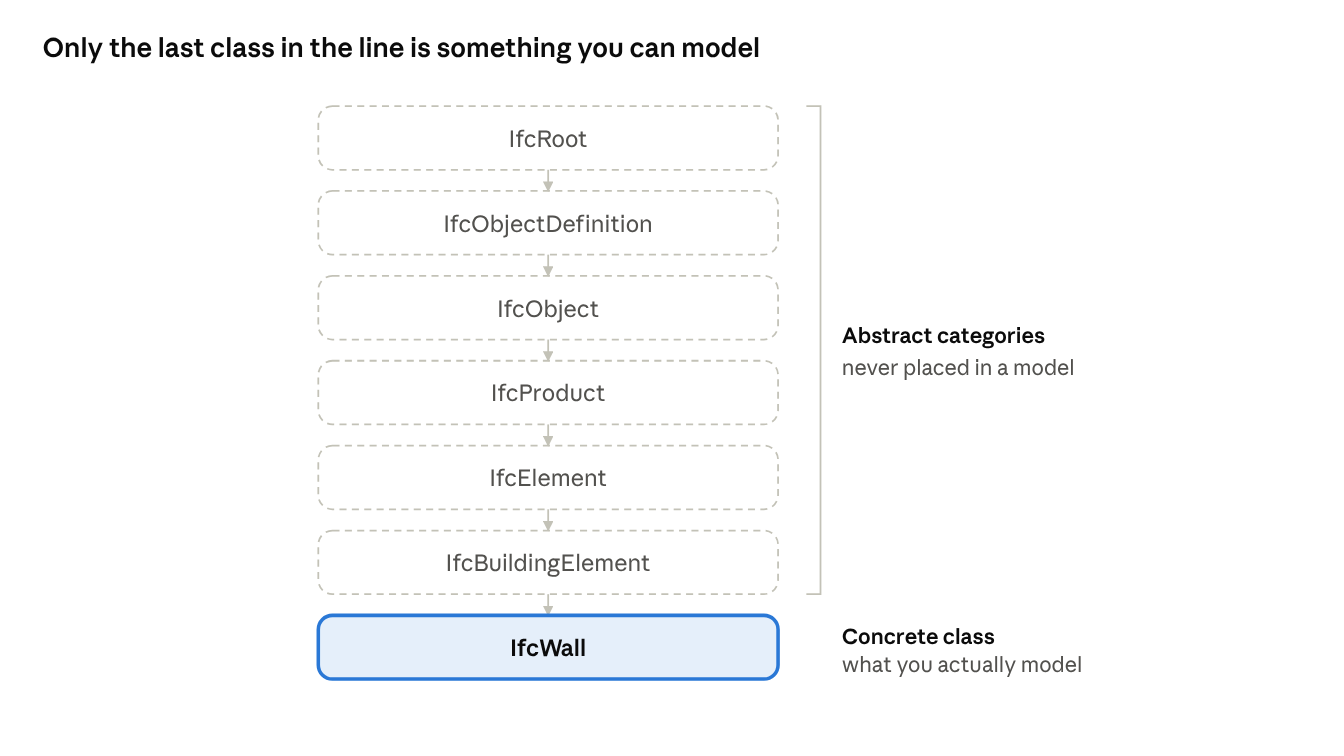
Classes form a family tree. A wall sits at the bottom of this line: IfcRoot > IfcObjectDefinition > IfcObject > IfcProduct > IfcElement > IfcBuildingElement > IfcWall. Some of those classes are abstract, while the others are concrete. Abstract classes are, for instance, IfcElement and IfcBuildingElement: they group things, but no object in your model will ever be one of them. Your wall is an IfcWall - this is a concrete class. (In IFC 4.3 IfcBuildingElement was renamed IfcBuiltElement, same idea.)
Now the scale. The IFC4 schema is HUGE! Even if we narrow it down to sets and properties only, it still holds around 3000 combinations! As plain text that's more than 100 000 tokens. Remember that number, we'll come back to it.
Why does AI make them up?
1. It's statistics, not knowledge
A language model doesn't look anything up. It predicts the most probable next word, based on everything it read during training. Think of a graduate who has read every standard in the library but has never opened an IFC viewer. Ask a question and you get a fluent, confident answer, built from what usually goes together.
Most of the time that's good enough. In IFC, "usually goes together" isn't the same as "exists".
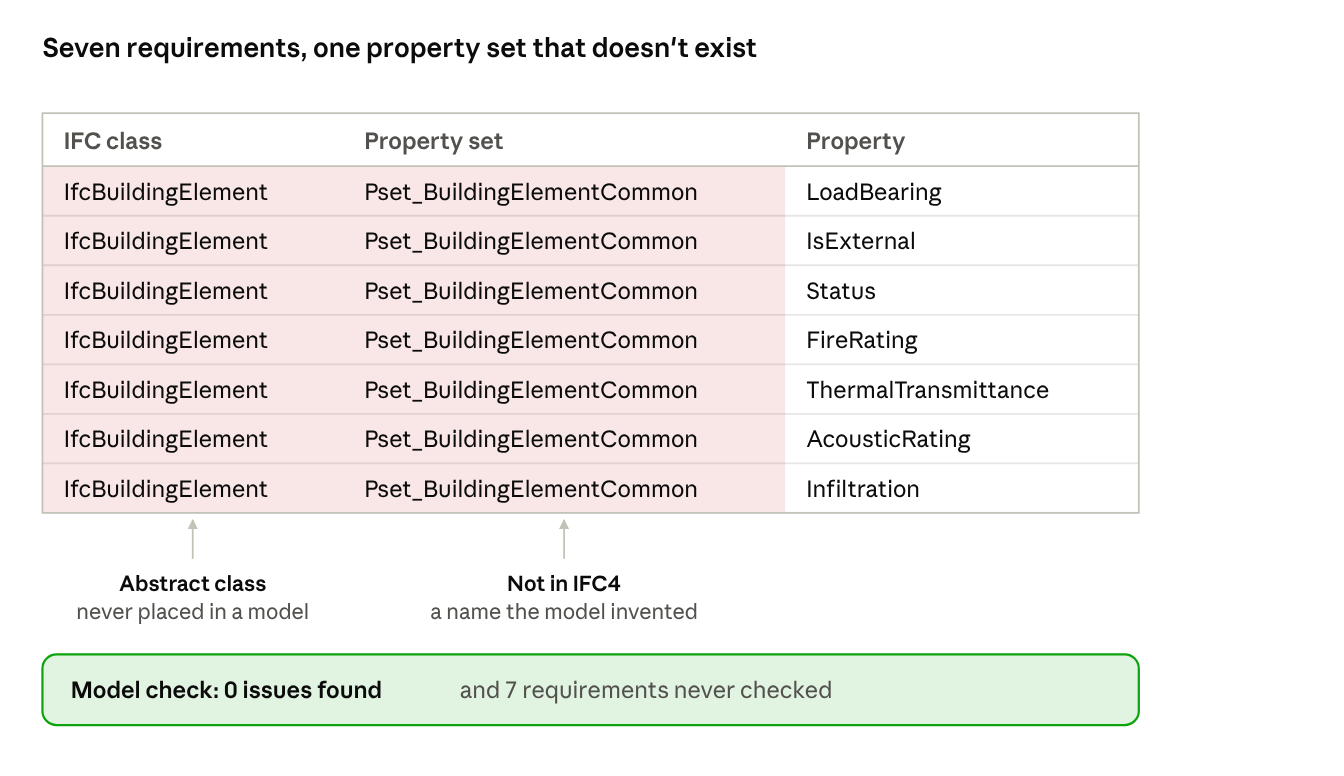
Example: Pset_WallCommon, Pset_DoorCommon and Pset_BeamCommon are real. Gemini continued the pattern one step too far and produced Pset_BuildingElementCommon, assigned to IfcBuildingElement. Seven requirements landed there: LoadBearing, IsExternal, Status, FireRating, ThermalTransmittance, AcousticRating and Infiltration. Two mistakes in one row. The property set doesn't exist in IFC4, and IfcBuildingElement is abstract, so no object in your model will ever be one. Check a model against that and you get zero issues. Seven requirements, never checked.
2. It knows the famous properties and puts them everywhere
FireRating, LoadBearing and IsExternal show up everywhere: in documentation, forums, YouTube tutorials and BEPs available on the internet. The model has seen them so many times that it attaches them to almost anything.
Example: IsExternal and FireRating in Pset_FootingCommon. The real set holds three properties: LoadBearing, Reference and Status. In the same run, LoadBearing landed in the property sets of windows, doors, a floor finish and a suspended ceiling. So, according to AI, a suspended ceiling holds up the building. Spoiler: it doesn't 😉
3. Needle in a haystack problem
Remember the 100 000 tokens? Your requirement is one short sentence (a needle), and the Large Language Model has to match it to one of around 3000 combinations, where plenty of names differ by a single word: Pset_PipeSegmentTypeCommon, Pset_PipeFittingTypeCommon (haystack). Even with the schema right in front of it, a near miss is easy. This is how AI works - finding a needle in a haystack is a common and well-known issue. A filtering script would find it in no time, but AI has huge problems with that.
Example: the requirement was "pressure rating" for pipes. For IfcPipeSegment, Gemini answered Pset_PipeFittingTypeCommon.PressureClass. A real property in a real set, but that set belongs to pipe fittings, not pipe segments. Right family, wrong object. The same run put luminous flux on a light fixture through Pset_LampTypeCommon, a set that belongs to the lamp.
4. Abstract classes sit at the top of the list
When I first gave the model the IFC schema with abstract classes included, it leaned towards them, simply because they sat closer to the top of the list. This is yet another feature of AI - tokens at the beginning and at the end give the strongest signals.
So it started to classify - a wall? Well, it's a building element. A window? Also a building element. A footing? Same. You get the idea. Pset_BuildingElementCommon from point 1 shows the same pull: an invented set on a class you can't model. Engineering workflows like checking or modelling tools need the concrete class. Abstract classes are mostly used by software developers.
So what do you do?
These habits already help, whatever you use AI for.
- Allow "I don't know". Tell the model in your prompt that "there's no standard property for this" is a valid answer, and that you prefer it to a guess. Without that permission it will always find something. In one of my runs AI answered a requirement with PROJECT-DEFINED: requires Custom_System with system reference properties. That's the honest answer, and the right one: a custom set, agreed in your BEP, without the
Pset_prefix. - Ask for a quote from the source on every row. The client's own sentence, next to the property AI picked. When the quote says "pressure rating of pipes" and the property sits on a pipe fitting, you see it in a second. And when AI can't quote anything at all, you've probably just caught an invented requirement.
- Check against the schema, not against AI. Asking the same model "are you sure?" gets you a polite yes. Open the buildingSMART documentation instead, find the property set and look at which classes it applies to. For a few rows that takes two minutes each. For a whole table you need an automatic check, and that's what the Verify step of my Draft, Verify, Validate method does. If you want to see how much better AI gets with the right context files, I showed a first version in LOIN to IDS.
Nadja, one of the participants of the first course edition, put it well:
"I liked a lot that it is not just 'here is your result' but also the verifying - I will add this part to other things I build with AI."
Summary
AI doesn't know IFC. It knows what IFC usually looks like, and it fills every gap with something that sounds standard. Your own properties are perfectly fine - just don't start their names with Pset_.
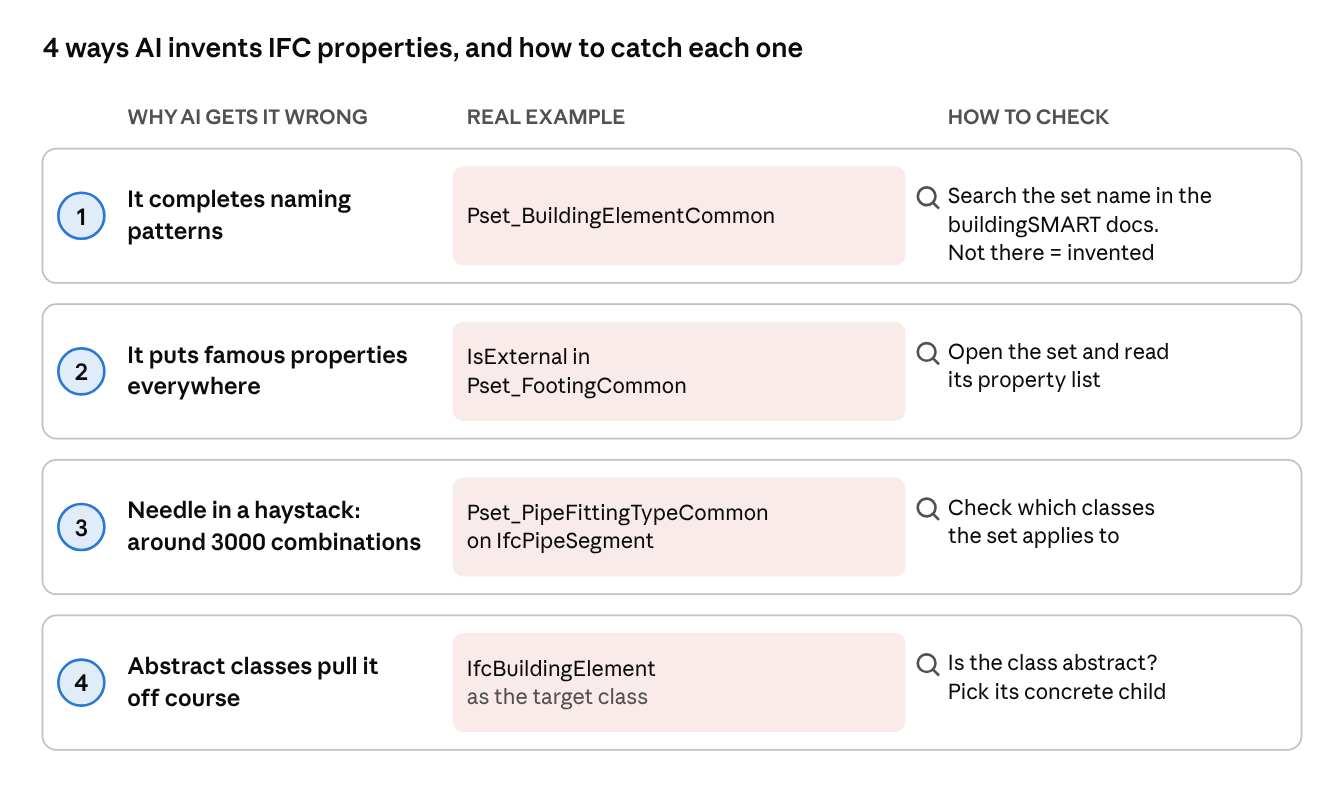
| Why AI gets it wrong | Real example from my runs | How to check |
|---|---|---|
| It completes naming patterns | Pset_BuildingElementCommon | Search the set name in the buildingSMART documentation. Not there = invented |
| It puts famous properties everywhere | IsExternal in Pset_FootingCommon, LoadBearing on a suspended ceiling | Open the set and read its property list |
| Needle-in-a-haystack problem | Pset_PipeFittingTypeCommon on IfcPipeSegment | Check which classes the set applies to |
| Abstract classes pull it off course | IfcBuildingElement as the target class | Is the class abstract? Pick its concrete child |
Want to try AI on your own requirements, with the guardrails in place? Sign up for the free LOIN to IDS Translator here.
And tell me in the comments: what's the strangest property AI has ever handed you? 🙂